Physical Tenant isolation model
Learn how Physical Tenants isolate execution, storage, and API routing within a single Orchestration Cluster.
About
A Physical Tenant is an isolated execution unit inside one Orchestration Cluster, with its own storage, identity, and backups.
This page covers one Orchestration Cluster with multiple Physical Tenants. Multi-region and multi-cluster topologies are separate topics.
New to Physical Tenants? Start with the Physical Tenants overview to compare tenancy models, or jump straight to set up two isolated Physical Tenants for a hands-on walkthrough.
Isolation model
Isolation applies differently at each layer of the stack:
| Layer | Isolation model | Shared or isolated |
|---|---|---|
| Primary storage | Dedicated Raft groups per Physical Tenant. A single tenant can span multiple brokers. | Isolated |
| Brokers | Brokers are co-located and can host more than one Physical Tenant. | Shared infrastructure |
| Gateways | Gateways route requests to the targeted tenant. | Shared |
| Secondary storage | Use a tenant-specific schema, index prefix, or separate backend, depending on the storage type. | Isolated |
| Document store | Use a tenant-specific bucket, container, or subpath. The exact convention depends on the cloud provider. | Isolated |
Architecture
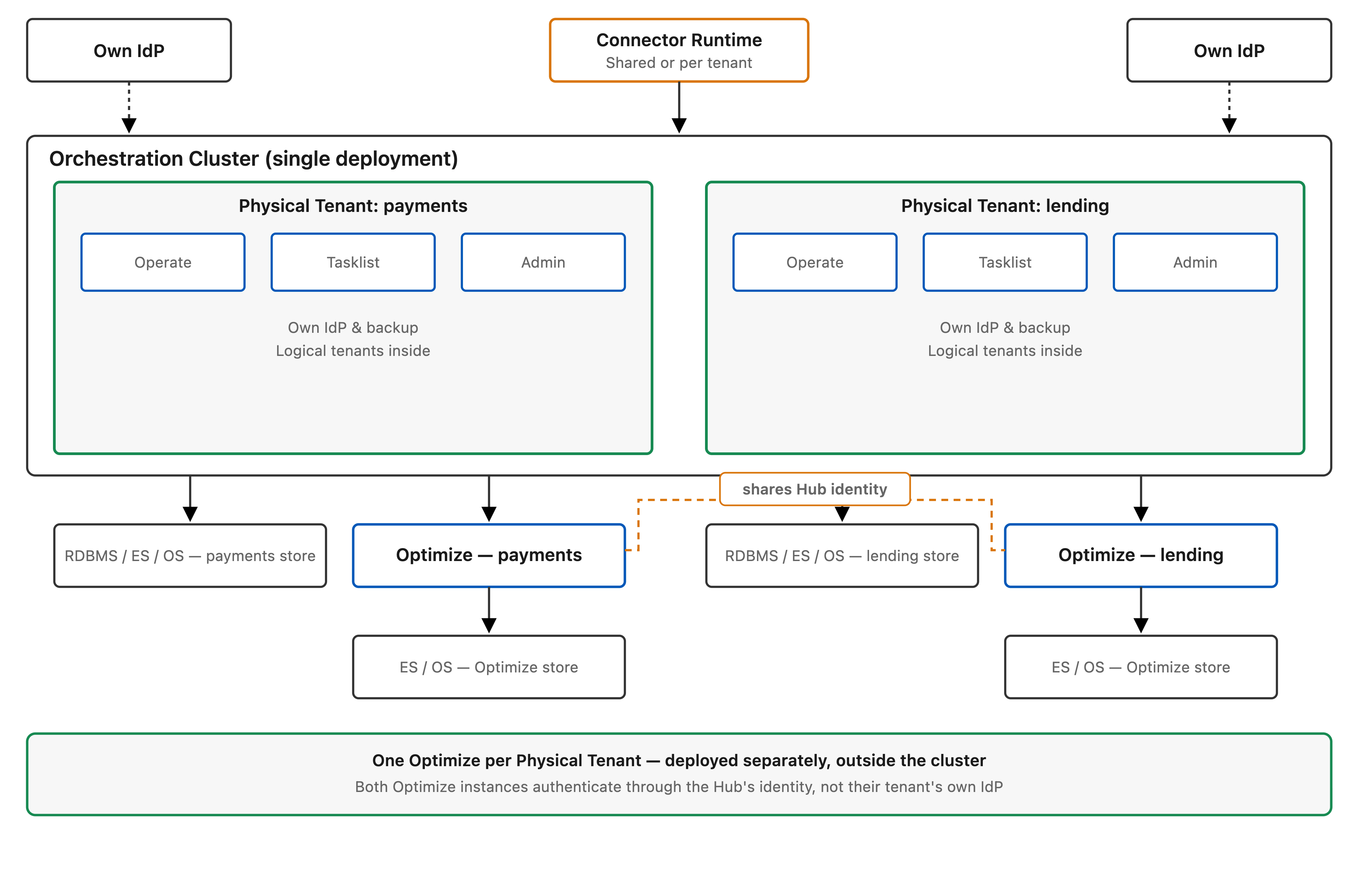
The diagram shows one Orchestration Cluster boundary with shared control-plane components and tenant-specific execution and storage boundaries.
The same isolation extends to authentication and authorization, and web apps. Each Physical Tenant authenticates through its own identity provider, gets its own Operate, Tasklist, and Admin, and its own backup and restore, while Logical Tenants remain available for lightweight subdivision inside each one:
API routing
Use tenant-scoped routes for tenant-specific requests:
- REST:
/physical-tenants/{physicalTenantId}/v2/... - gRPC:
Camunda-Physical-Tenantheader (routes todefaultwhen omitted) - Default tenant compatibility: plain
/v2/...requests route to the default Physical Tenant
Cluster-wide management endpoints use a dedicated /cluster/v2/... path prefix and require the cluster-admin role, except GET /cluster/v2/status, which is deliberately unauthenticated so load balancers can use it as a health check. Tenant-scoped endpoints use /physical-tenants/{physicalTenantId}/v2/...; endpoints at the standard /v2/... paths, including /v2/topology, are scoped to the default Physical Tenant. See cluster admin for the operations served under this prefix.
Day-2 operations
To configure tenant defaults, per-tenant overrides, validation expectations, and property examples, see configuration reference.
To provision new tenants and understand lifecycle behavior in 8.10, including rolling restart expectations and unsupported operations, see provisioning and lifecycle.
Learn how Operate, Tasklist, and Optimize behave per Physical Tenant, including URL navigation, data scoping, and session behavior, in web app routing.
To size broker memory, secondary storage, and noisy-neighbor protection as you add tenants, see size clusters with Physical Tenants.
For post-deployment operations, see back up and restore and cluster scaling.
To serve several Physical Tenants from one App Integrations deployment, including per-tenant audiences and notification routing for Microsoft Teams, see App Integrations.
Camunda Spring Boot Starter applications with multiple clients
When you configure multiple clients in a Camunda Spring Boot Starter application, the starter registers every @JobWorker against all configured clients and deploys every @Deployment resource to all configured clients. Workers can therefore poll and process jobs across multiple Physical Tenants, and the same BPMN resources can be deployed to each tenant. See Physical Tenant behavior for job workers and deployment behavior for multi-client applications.
Optimize deployment
Deploy Optimize separately for each Physical Tenant, as its own release, and point each instance at that tenant's exported records. For how to deploy Optimize per Physical Tenant and share one Management Identity across them, see Optimize and Physical Tenants.
What is not isolated
- Gateways are shared between tenants, so a saturated gateway can still affect multiple tenants.
- Brokers are co-located and shared infrastructure remains part of the deployment.
- Full performance isolation is out of scope for the first version.
- Future versions may reduce sharing further, for example through more isolated actor-thread or runtime placement, but that is not part of 8.10.
Storage validation
Camunda validates storage configuration at startup. If two tenants resolve to the same backend location, startup fails and the error names the conflicting tenants. For document stores, uniqueness is validated against the resolved provider, bucket or container, and path tuple.
Health and status endpoints
Physical Tenants expose three distinct endpoints for health and status:
| Endpoint | Scope | Use when |
|---|---|---|
/actuator/health | Node | Checking whether the individual broker or gateway node is healthy, ready, or live (for example, Kubernetes probes). Exposed on port 9600 by default (brokers and gateways); the other endpoints below are exposed on the Gateway REST port (8080 by default). |
/cluster/v2/status | Cluster | Determining whether the cluster as a whole is operational. |
/physical-tenants/{id}/v2/topology | Tenant | Checking whether a specific Physical Tenant can accept work and which of its partitions are available. |
/physical-tenants/{id}/v2/topology is the tenant-prefixed form of /v2/topology: the same endpoint, reached through the tenant prefix. An unprefixed /v2/topology request returns the default tenant's topology, not a cluster-wide view. For the cluster-wide aggregate, use /cluster/v2/topology.
The /v2/status endpoint is scoped to the default Physical Tenant. Use /cluster/v2/status for overall cluster status or /physical-tenants/{id}/v2/topology for per-tenant status.
Readiness
When configuring Kubernetes readiness probes, point the probe at /actuator/health/readiness for node-level readiness. To check whether a specific Physical Tenant can accept work independently of the node probe, poll /physical-tenants/{id}/v2/topology from your own health-check logic.
For Elasticsearch and OpenSearch deployments, the secondary-storage readiness check uses schema-initialization state. The check is UP while at least one Physical Tenant is serviceable and DOWN when none are serviceable, but the overall readiness group can still be DOWN because of other readiness contributors. If one tenant's secondary storage is unusable, that tenant is degraded on its own: its storage-dependent REST endpoints return 503 with a Retry-After header while every other serviceable tenant continues to serve traffic. Camunda retries the degraded tenant in the background, so it recovers without a restart once you repair the underlying cause.
To see each tenant's schema-initialization state and the reason a tenant is degraded, inspect the physicalTenantSchemaInitialization contributor of /actuator/health. See schema-initialization health. For diagnosis steps, see troubleshooting.
Document store details
Document stores are declared once in the root camunda.document.* catalog. Each Physical Tenant inherits the catalog and overrides only the fields it needs, typically the bucket path or prefix, to ensure its data is written to a distinct location.
Isolation is enforced by validating the resolved provider, bucket/container, path tuple at startup. If two tenants resolve to the same tuple, Camunda fails startup and names the conflicting tenants in the error.
For configuration examples covering shared buckets with per-tenant paths, dedicated buckets per tenant, and GCP prefix isolation, see document store storage.
For the storage backends used by tenant-scoped data, see secondary storage and document handling configuration.
Deploying Physical Tenants with Helm
The Helm chart passes tenant configuration through rather than modeling it: there's no orchestration.physicalTenants values key, and tenants are declared as camunda.physical-tenants.* application configuration through orchestration.extraConfiguration. See Helm and application configuration responsibilities.
What the chart does own is the release shape around your tenants. Each tenant needs its own Optimize release, its own index prefixes, and its own OIDC client, and adding or removing a tenant is an ordered operation across several releases.
For the release-level view, see configure Physical Tenants across releases. For the delivery mechanics alone, see configure Physical Tenants in Helm chart.
Explore the docs
Isolation model
Learn how Physical Tenants isolate execution, storage, and API routing within a single Orchestration Cluster.
Getting started
A hands-on walkthrough for adding a strongly isolated second team to a Self-Managed cluster with Helm.
Configuration reference
Configure Physical Tenants in Self-Managed deployments with root defaults, per-tenant overrides, and startup validation rules.
Provisioning and lifecycle
Learn how to provision and manage Physical Tenants, including restart behavior and out-of-scope operations.
Storage isolation
Configure separate storage backends per Physical Tenant for RDBMS, Elasticsearch/OpenSearch, and Document Store.
Custom exporters
Learn how to assign a globally-defined custom exporter to specific Physical Tenants, or declare an exporter that is private to one tenant.
Authentication and authorization
Learn how identity providers, token routing, and per-tenant authorization work for Physical Tenants.
Authorization model
Learn how cluster-wide and tenant-local authorization work for Physical Tenants.
API routing
Learn how REST API requests are routed to Physical Tenants, including tenant-scoped paths, default tenant routing, and gRPC routing.
Troubleshooting
Diagnose startup, routing, authorization, storage, and performance problems in an Orchestration Cluster running multiple Physical Tenants.
Connectors runtime
Configure one Connectors runtime instance to serve multiple Physical Tenants, with per-tenant job workers, opt-in secret scoping, and inbound webhook routing.
Optimize
Learn how to deploy Optimize per Physical Tenant, how one Management Identity isolates multiple Optimize deployments, and the limitation with logical tenants that reuse the same ID across tenants.
App Integrations
Configure one App Integrations deployment to serve several Physical Tenants, with per-tenant web apps, audiences, and notification routing.