Cold Recovery
Cold recovery uses scheduled cross-region backups and a manual restore procedure to recover from complete primary-region loss.
Cold Recovery is Camunda's lowest-cost multi-region resilience configuration. It provides a documented, repeatable recovery path from complete primary-region loss using scheduled backups exported to cross-region object storage and a manual restore procedure into a secondary region.
Cold Recovery is suited for production workloads in which recovery measured in hours is operationally acceptable.
| Consideration | Value |
|---|---|
| Recovery time (RTO) | ~1–4 hours (operator and environment dependent) |
| Data loss (RPO) | 15 minutes – 4 hours (backup-interval dependent) |
| Failover mode | Manual, operator-initiated |
| Standing second region required? | No. Restore into a newly provisioned region |
Architecture
In Cold Recovery, a single active region runs the Camunda Orchestration Cluster.
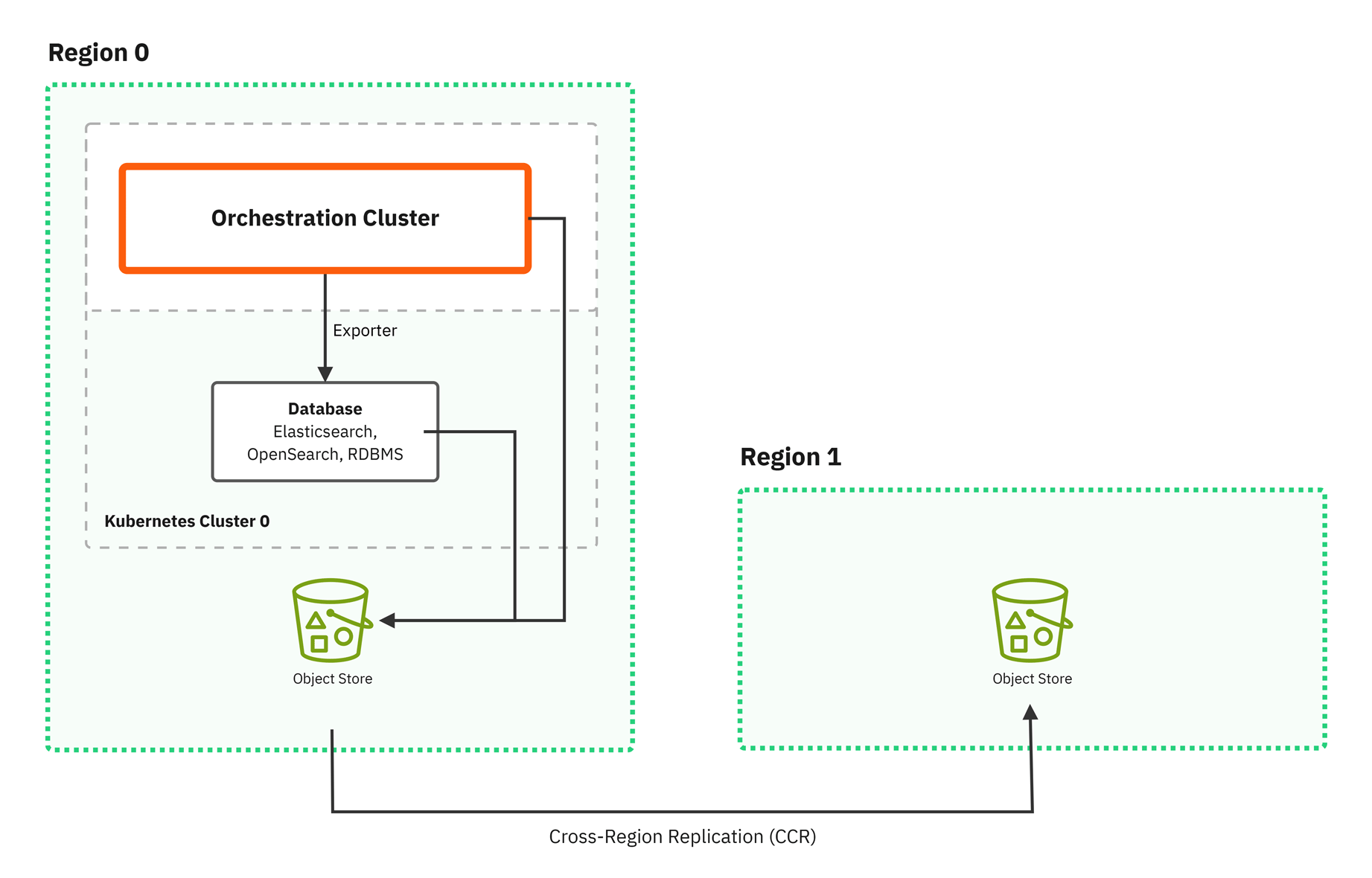
- Automated backup jobs export Zeebe partition snapshots and secondary storage backups (Elasticsearch, OpenSearch) to an S3-compatible object storage bucket replicated to a separate region. RDBMS secondary storage relies on database backup tools and must ensure durability across multiple regions.
- There is no warm standby. For example, a second cluster does not run during normal operations.
- On primary-region failure, an operator provisions a new environment in the secondary region and restores from the most recent consistent backup set.
Backup scope
You must back up both Primary and Secondary storage layers for a complete Cold Recovery backup. See backup and restore.
| Layer | Backup target | Backup mechanism |
|---|---|---|
| Primary storage (Zeebe log stream) | Zeebe partition snapshots | Zeebe Backup Management API |
| Secondary storage (Elasticsearch/OpenSearch) | Elasticsearch/OpenSearch index snapshots | Orchestration cluster backup API |
| Secondary storage (RDBMS) | Database dump or continuous backup | Database-native tools (pg_dump, Oracle RMAN, AWS RDS automated backup) |
The RDBMS backup path is the first phase of new backup capabilities and currently covers a narrower set of components than the Elasticsearch/OpenSearch path. See relational database backup for the components it includes.
Component coverage
The following table shows backup component coverage:
| Component | Included in backup? | Notes |
|---|---|---|
| Zeebe (primary storage) | Yes (partition snapshots) | Required |
| Operate | Yes (via Elasticsearch/OpenSearch or RDBMS backup) | State is stored in secondary storage |
| Tasklist | Yes (via Elasticsearch/OpenSearch or RDBMS backup) | State is stored in secondary storage |
| Admin | Yes (via Elasticsearch/OpenSearch or RDBMS backup) | Authentication and authorization configuration |
| Optimize | Elasticsearch/OpenSearch path only | Standalone component; back up independently |
| Management Identity | Not included | Standalone component; back up independently |
| Camunda Hub | Not included | Standalone component; back up independently |
| Connectors | Not included | Stateless; redeploy from source |
Cross-region backup replication
Cross-region replication of the backup storage is the necessary requirement of Cold Recovery.
- If backups exist only in the primary region, there is no disaster recovery when that region is lost, as the backups are lost with it.
- As such, replication is mandatory, and not optional or just best practice. It is a prerequisite for Cold Recovery to work.
The primary backup bucket must replicate objects to a bucket in a separate region so that backup data remains accessible if the primary region becomes unavailable. For S3-compatible object storage, this is typically configured as continuous cross-region replication on the bucket itself. For RDBMS secondary storage, use the database's native cross-region backup replication instead of S3 bucket replication.
This means:
- The replica bucket lives in a different region from the primary cluster.
- Replication runs continuously and automatically - there is no manual copy step.
- Replication lag is monitored and bounded; an unreplicated backup is not yet a recoverable backup.
- The replica bucket's access policies allow restore from a freshly provisioned secondary-region environment that does not yet exist at backup time.
For provider-specific guidance, see backup and restore.
Backup requirements
In addition to cross-region replication, you must make sure the following is in place before a failure occurs:
Regular backup schedule: Both Orchestration cluster and secondary storage must be backed up on a consistent schedule. Backup frequency directly determines RPO: a 1-hour backup interval means up to 1 hour of data loss in the worst case.
For configuration instructions and scheduling guidance, see backup and restore.
Recovery flow
When the primary region fails, Cold Recovery follows this sequence:
- Detect and declare: Confirm the primary region is unavailable and initiate the recovery process.
- Fence the old region: Before redirecting traffic, ensure the original region's cluster, job workers, and connectors are stopped or otherwise prevented from acting. See fencing the old region.
- Provision: Spin up a new Camunda environment in the secondary region (or activate a pre-provisioned standby if one exists).
- Select restore point: Identify the most recent complete, consistent backup set from the replica S3 bucket.
- Restore Camunda Orchestration cluster: Follow the restore procedure.
- Start and verify: Deploy the Orchestration Cluster against the restored data and confirm health before routing traffic.
- Redirect traffic: Update applications, DNS or load balancer configuration to point production traffic at the secondary region.
The total elapsed time across all these steps is the realized RTO. For step-by-step restore instructions, see backup and restore.
We recommend testing this recovery flow end-to-end before a real incident occurs. Prior validation ensures each step works as expected in your environment.
Step 1 (detect and declare) is not instantaneous and is often the largest variable contributor to total RTO. Time-to-detect (how long until the outage is recognized) and time-to-decide (how long until the on-call operator authorizes a failover) can each run from minutes to hours depending on monitoring coverage, paging rotation, and escalation policy. The published 1–4 hour RTO assumes these phases are exercised regularly; otherwise they dominate the realized recovery time.
Fencing the old region
If the region is truly gone, nothing is running there and no fencing is needed. The problem is when the region only looks gone — a network partition means you cannot reach it, but the Orchestration Cluster, job workers, and connectors are still running inside it.
If you start the restored cluster without first stopping the old one, you will have two clusters that both think they own the same process instances. Each one can run the same action twice, such as sending the same payment, email, or API call a second time.
Repointing DNS or load balancers does not solve this, as job workers and connectors do not route through the front-door traffic layer - they poll Zeebe and call external systems directly.
Before redirecting traffic, ensure the old region cannot act. Use one or more of the following mechanisms, in order of preference:
- Stop or scale down the old deployment if it is reachable (for example, scale Zeebe brokers, gateways, workers, and connector deployments to zero).
- Revoke the old region's credentials and identity so it can no longer authenticate to external systems or downstream APIs.
- Isolate the old region at the network layer (security groups, firewall rules, or VPC routing) so it cannot reach external systems even if it remains running.
Document and rehearse the specific mechanism you will use as part of your DR drill — fencing is operationally specific to your environment and must be tested before a real incident.