Physical Tenants
Physical Tenants enable strong data isolation and independent management within a single Camunda 8 cluster.
About
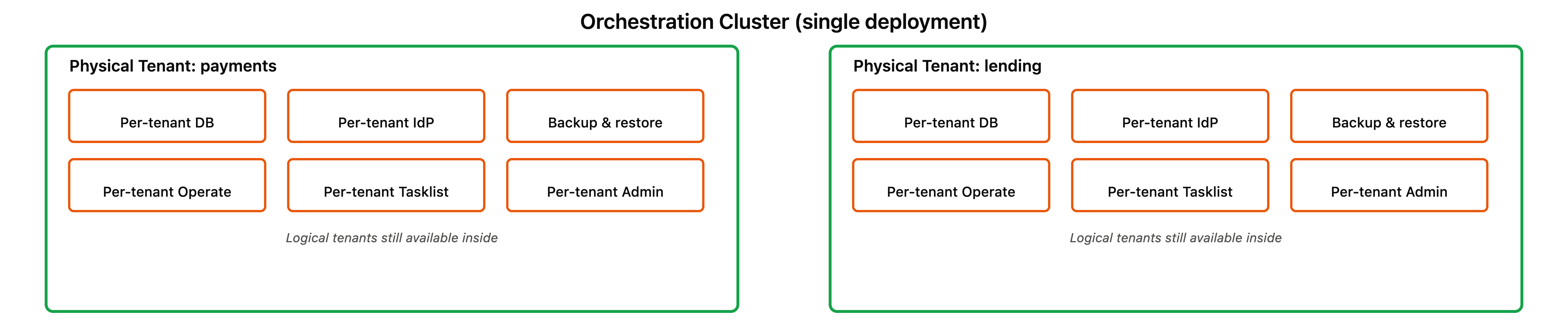
A Physical Tenant is an isolated execution unit within an Orchestration Cluster. Multiple Physical Tenants can run in a single cluster, each with fully isolated data, its own partition group, and independent lifecycle management.
Isolation covers data and management, not compute. Physical Tenants share the cluster's brokers and gateways, so runtime interference between tenants is reduced but not eliminated. See what is not isolated.
Physical Tenants provide a balanced approach to multi-tenancy. They offer strong isolation without the operational complexity and cost of running separate clusters. See multi-tenancy overview to compare isolation models.
Why Physical Tenants
Strong isolation without complexity: Run multiple teams or organizations on one cluster with complete data separation and independent operations, without the overhead of managing multiple orchestration clusters.
Independent operations: Back up, restore, scale, and manage each Physical Tenant independently, without coordinating a window across every tenant in the cluster.
Cost efficiency: Share infrastructure while maintaining tenant autonomy, reducing operational overhead compared to multi-cluster deployments.
Terminology
Physical Tenant
An isolated execution unit within an Orchestration Cluster. Each Physical Tenant has separate data storage, independent lifecycle management, and API access scoped to that tenant.
Default Physical Tenant
Every Orchestration Cluster automatically includes a default Physical Tenant created at provisioning time. The default Physical Tenant is immutable and cannot be renamed, disabled, or deleted. For backward compatibility, REST API traffic not explicitly scoped to a Physical Tenant is internally routed to the default Physical Tenant. This routing rule is specific to the /v2/... REST API; the actuator surface used for scaling and purging does not follow it (see data purge for an operation where an unscoped request instead targets every tenant).
Cluster-wide operation
An operation that affects the entire Orchestration Cluster, such as cluster configuration updates, cluster-level health checks, or cluster backups. Cluster-wide operations are protected by the cluster-admin role and are not scoped to a specific Physical Tenant.
Tenant-scoped operation
An operation that targets a specific Physical Tenant, such as deploying a process to a tenant, backing up a tenant's data, or querying a tenant's process instances.
API and access patterns
Tenant-scoped APIs are accessible at /physical-tenants/{physicalTenantId}/v2/:
- REST API:
POST /physical-tenants/mytenant/v2/process-definitions - Webapps:
https://your-cluster/physical-tenants/mytenant/operate
Cluster-wide APIs use a dedicated /cluster/v2/... path prefix. Cluster-wide management endpoints require the cluster-admin role, except GET /cluster/v2/status, which is deliberately unauthenticated so load balancers can use it as a health check. Endpoints at the standard /v2/... paths, including /v2/topology, are scoped to a Physical Tenant, not the cluster.
gRPC clients specify the Physical Tenant using the Camunda-Physical-Tenant custom header.
Logical and Physical Tenants together
Logical Tenants remain available within each Physical Tenant as a lightweight subdivision mechanism. You can use Logical Tenants for cost-efficient sub-division (for example, multiple departments within a team) while relying on Physical Tenants for strong isolation (for example, separate teams within an organization).
See Logical Tenants for details on the lightweight tenant-ID based model.
There is no migration path from Logical Tenants to Physical Tenants. Logical Tenants created in a Physical Tenant remain associated with that tenant and cannot be migrated to another Physical Tenant.
Physical Tenants in Camunda Hub
In Camunda Hub, each Physical Tenant is an environment, and teams deploy to it instead of to the cluster. See how an environment maps to infrastructure for the naming.
Wording conventions
When referencing Physical Tenants and Logical Tenants in documentation and code:
- Use
physicalTenantIdwhen referencing Physical Tenant API parameters, configuration keys, or system identifiers. - Use
tenantIdonly when referencing Logical Tenants (backward-compatible with existing API). - Existing API keys remain unchanged.
- Use Physical Tenant and Logical Tenant (capitalized) as the canonical terms.
Learn more
- For detailed technical information about isolation model, architecture, and storage configuration, see physical tenant isolation model.
- To set up a second isolated Physical Tenant end to end, see set up two isolated Physical Tenants.
- For tenant configuration defaults, overrides, validation, and examples, see configuration reference.
- For adding tenants and lifecycle expectations in 8.10, see provisioning and lifecycle.
- For how REST API requests are routed to Physical Tenants, including default tenant compatibility and HTTP status codes, see API routing.
- For identity deployment models, token routing, and per-tenant authorization, see authentication and authorization.
- For how authorization is divided between cluster-wide and tenant-local operations, see authorization model.
- For how Physical Tenant storage isolation works across primary storage, secondary storage, and document stores, see storage isolation.
- For how Physical Tenants map onto Helm releases, including the per-tenant Optimize release, index prefixes, and tenant lifecycle operations, see configure Physical Tenants across releases.