Conditional events
Conditional events allow a process to react to changes in process state instead of waiting for a message or signal. For example, when a variable crosses a threshold, a required set of fields becomes complete, a risk score changes, or a business rule flips from false to true.
Conditional events are useful when the producer of a change is not a single known sender, when correlation logic would add unnecessary complexity, or when the process logic is naturally expressed as guard conditions over process state.
The engine evaluates the FEEL expression and triggers the event when the expression evaluates to true. The diagram below shows all four types of conditional events: root-level start, event sub-process start, intermediate catch, and boundary events.
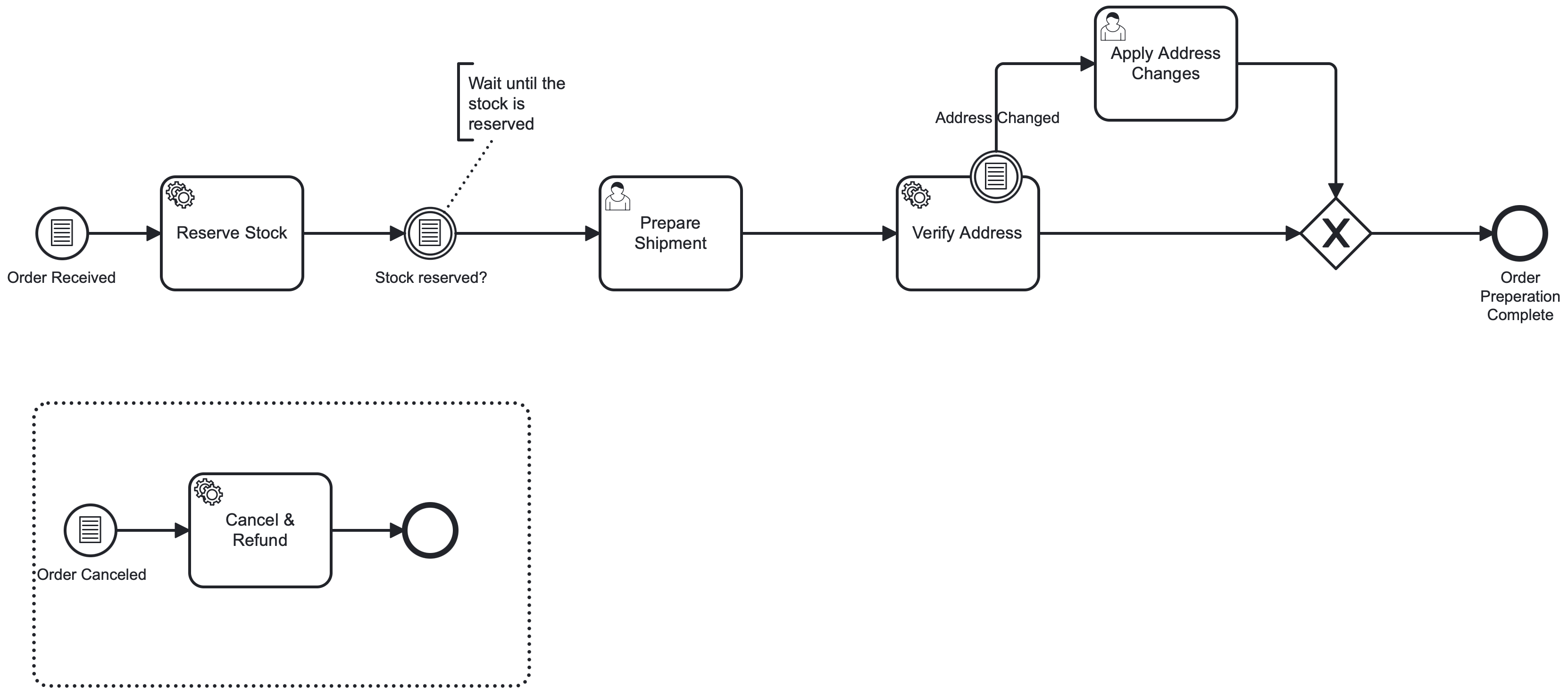
In this example, the process starts with a root-level conditional start event. Root-level conditional start events can be triggered via the Orchestration Cluster REST API or Camunda Client SDKs (see trigger root-level conditional start events via API for more details). A new instance is created once the condition = orderReceived = true evaluates to true.
The intermediate conditional catch event acts like a wait-until condition. It continues to “Ship order” only after inventory is successfully reserved.
The interrupting conditional boundary event attached to “Review order” handles changes mid-review. If the delivery address is changed, the boundary event triggers and interrupts the user task, routing execution to “Apply changes” before completing the order preparation.
Finally, the interrupting event sub-process can cancel the work at any time while the instance is running. If the order is canceled while it is being prepared, the conditional start event inside the event sub-process fires and interrupts the main process, starting the cancellation sub-process to handle the cancellation logic. See triggering conditional events for details on how and when conditional events are triggered.
Conditional start events
Conditional start events can be used to start a process instance. Deploying a process with a conditional start event creates a subscription for that event. When the condition of the start event evaluates to true, the engine starts a new process instance.
When deploying a process with a conditional start event, the following rules apply:
- The condition of the conditional start event must be unique across a process definition. If multiple conditional start events have the same condition, the deployment will fail with a validation error.
- Upon deployment of a new version, the previous version’s conditional start event subscription is removed and replaced with the new version’s subscription.
To start processes via conditional start events from external systems, use the Orchestration Cluster REST API, the Zeebe gRPC API, or a Camunda Client SDK. See trigger root-level conditional start events via API for more details.
Event sub-process conditional start events
Event sub-process conditional start events start an event sub-process within an active process instance when the configured condition evaluates to true in the scope of that instance.
This allows a running instance to react to state changes (for example, cancellation flags, escalation thresholds, or data corrections) without requiring an external signal or message correlation.
An event sub-process conditional start event can be interrupting or non-interrupting:
- Interrupting starts the event sub-process and cancels the currently active work in the scope it interrupts, so the instance continues via the event sub-process path.
- Non-interrupting starts the event sub-process in parallel while the existing execution continues.
A non-interrupting event sub-process conditional start event can trigger more than once while the instance is active. It triggers each time the condition becomes true, based on changes to variables referenced in the expression. You can use variable event filters to further restrict which change types (create, update) trigger evaluation. For runtime evaluation behavior and filter semantics, see variable filter semantics.
Intermediate conditional catch events
An intermediate conditional catch event waits until its condition becomes true. When the process instance reaches the event, it waits until the condition evaluates to true, then continues along the outgoing sequence flow. For details on how and when the condition is triggered, see triggering conditional events.
Intermediate conditional catch events are always interrupting, as they represent a waiting point in the process flow.
Conditional boundary events
A conditional boundary event is attached to an activity and monitors data while the activity is active. When the activity is entered, the engine evaluates the boundary event’s condition and triggers immediately if the condition is satisfied.
Conditional boundary events can be interrupting or non-interrupting:
- Interrupting triggers the boundary event and cancels the attached activity, so execution continues via the boundary event’s outgoing sequence flow.
- Non-interrupting triggers the boundary event without canceling the attached activity, starting an additional path via the boundary event’s outgoing sequence flow while the attached activity continues.
Like a non-interrupting event sub-process conditional start event, a non-interrupting conditional boundary event can trigger multiple times while the attached activity is active. It triggers each time the condition becomes true, based on changes to variables referenced in the expression. You can use variable event filters to further restrict which change types trigger evaluation. See variable filter semantics for details.
Define conditions and variable filters
Condition expressions (FEEL)
Conditional events use a FEEL expression in the bpmn:condition element. The expression must evaluate to a boolean value (true or false).
For example:
<bpmn:conditionalEventDefinition id="ConditionalEventDefinition_1">
  <bpmn:condition xsi:type="bpmn:tFormalExpression">
    = x > 1
  </bpmn:condition>
</bpmn:conditionalEventDefinition>
The engine evaluates the FEEL expression using variables available in the event’s scope and derives which variables can trigger the conditional event from the expression. For details, see expression-based evaluation.
Variable filters
Variable filters restrict when a conditional event is re-evaluated in response to variable changes for those referenced variables.
The variableEvents attribute applies only to conditional events inside running process instances. It does not apply to root-level conditional start events.
Define an event-type filter by adding a zeebe:conditionalFilter extension element:
<bpmn:conditionalEventDefinition id="ConditionalEventDefinition_1rp6yz6">
  <bpmn:condition xsi:type="bpmn:tFormalExpression">
    = x > 1
  </bpmn:condition>

  <bpmn:extensionElements>
    <zeebe:conditionalFilter
      variableEvents="create, update" />
  </bpmn:extensionElements>
</bpmn:conditionalEventDefinition>
The zeebe:conditionalFilter extension element supports:
variableEventsspecifies which variable events trigger evaluation. Supported values:createupdatecreate, update
For runtime behavior and limitations of variable filters, see variable filter semantics.
Modeling conditional events in Modeler
Camunda Modeler supports conditional start events, intermediate conditional catch events, and interrupting or non-interrupting conditional boundary events.
To add a conditional event:
- Select an existing start event, intermediate event, or boundary event, or use the Create element popup and search for conditional.
- Change the element type to Conditional start event, Conditional intermediate catch event, or Conditional boundary event as needed.
- With the conditional event selected, use the properties panel on the right to configure it:
- In the Condition field, enter a FEEL expression starting with
=(for example,= x > 1). - In the Variable filters section, optionally restrict when the condition is re-evaluated by specifying which variable events (
create,update, orcreate, update) should trigger evaluation.
- In the Condition field, enter a FEEL expression starting with
XML representation
Conditional start event
<bpmn:startEvent id="ConditionalStart">
  <bpmn:conditionalEventDefinition id="ConditionalEventDefinition_Start">
    <bpmn:condition xsi:type="bpmn:tFormalExpression">= amount > 100</bpmn:condition>
  </bpmn:conditionalEventDefinition>
</bpmn:startEvent>
Intermediate conditional catch event
<bpmn:intermediateCatchEvent id="WaitForCondition">
  <bpmn:conditionalEventDefinition id="ConditionalEventDefinition_Catch">
    <bpmn:condition xsi:type="bpmn:tFormalExpression">
      = processorAvailable
    </bpmn:condition>

    <bpmn:extensionElements>
      <zeebe:conditionalFilter
        variableEvents="create, update" />
    </bpmn:extensionElements>
  </bpmn:conditionalEventDefinition>
</bpmn:intermediateCatchEvent>
Conditional boundary event
<bpmn:boundaryEvent id="CancelReview" attachedToRef="ReviewApplication">
  <bpmn:conditionalEventDefinition id="ConditionalEventDefinition_Boundary">
    <bpmn:condition xsi:type="bpmn:tFormalExpression">
      = customerCancelled
    </bpmn:condition>
  </bpmn:conditionalEventDefinition>
</bpmn:boundaryEvent>