Call activities
A call activity (or reusable subprocess) allows you to call and invoke another process as part of this process. It's similar to an embedded subprocess, but the process is externalized (i.e. stored as separated BPMN) and can be invoked by different processes.
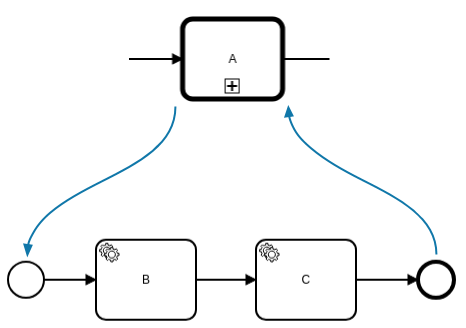
When a call activity is entered, a new process instance of the referenced process is created. The new process instance is activated at the none start event. The process can have start events of other types, but they are ignored.
When the created process instance is completed, the call activity is left and the outgoing sequence flow is taken.
Defining the called process
A call activity must define the BPMN process ID of the called process as processId.
Usually, the processId is defined as a static value (e.g. shipping-process), but it can also be defined as expression (e.g. = "shipping-" + tenantId). The expression is evaluated on activating the call activity and must result in a string.
The bindingType attribute determines which version of the called process is instantiated:
latest: The latest deployed version at the moment the call activity is activated.deployment: The version that was deployed together with the currently running version of the calling process.versionTag: The latest deployed version that is annotated with the version tag specified in theversionTagattribute.
To learn more about choosing binding types, see choosing the resource binding type.
If the bindingType attribute is not specified, latest is used as the default.
Boundary events

Interrupting and non-interrupting boundary events can be attached to a call activity.
When an interrupting boundary event is triggered, the call activity and the created process instance are terminated. The variables of the created process instance are not propagated to the call activity.
When a non-interrupting boundary event is triggered, the created process instance is not affected. The activities at the outgoing path have no access to the variables of the created process instance since they are bound to the other process instance.
Variable mappings
Input mappings can be used to create new local variables in the scope of the call activity. These variables are also copied to the created process instance.
If the attribute propagateAllChildVariables is set (default: true), all variables of the created process instance are propagated to the call activity. This behavior can be customized by defining output mappings at the call activity. The output mappings are applied on completing the call activity and only those variables that are defined in the output mappings are propagated.
If you set propagateAllChildVariables to false and define no output mappings, the variables of the created process instance are discarded when the call activity completes. To return only selected variables to the caller, keep propagateAllChildVariables enabled and define output mappings.
It's recommended to define output mappings if the call activity is in a parallel flow (e.g. when it is marked as parallel multi-instance). Otherwise, variables can be accidentally overridden when they are changed in the parallel flow. Disable propagateAllChildVariables only if the caller does not need the child process variables at all.
By default, all variables of the call activity scope are copied to the created process instance. This can be limited to copying only the local variables of the call activity, by setting the attribute propagateAllParentVariables to false.
By disabling this attribute, variables existing at higher scopes are no longer copied. If the attribute propagateAllParentVariables is set (default: true), all variables are propagated to the child process instance.
For how a call activity compares to other elements, see variable propagation by BPMN element.
Business ID propagation
When a parent process instance has a business ID, child instances created by call activities inherit it by default. Starting in 8.10, you can configure each call activity to override this behavior.
Default behavior
If no businessId configuration is set on the call activity, the child instance inherits the parent's business ID automatically. This is the 8.9 default. Existing models are unaffected.
Override with a literal value or FEEL expression
To set a different business ID on the child instance, configure the businessId attribute on the zeebe:calledElement extension element. The value is resolved once at child creation and is then immutable.
<bpmn:callActivity id="Call_Activity" name="Call Process A">
  <bpmn:extensionElements>
    <zeebe:calledElement processId="child-process"
                         businessId="= camunda.processInstance.businessId" />
  </bpmn:extensionElements>
</bpmn:callActivity>
You can use the FEEL expression context variable camunda.processInstance.businessId to reference the parent instance's business ID in the expression.
| Configuration | Effect |
|---|---|
| Attribute absent | Child inherits the parent's business ID (default). |
| Literal string | Child is created with that exact string as its business ID. |
FEEL expression (prefixed with =) | Child gets the evaluated result. Access the parent's ID with camunda.processInstance.businessId. |
Empty string "" or expression =null | Child starts with no business ID. No incident is raised. |
Validation and error handling
Business ID values go through two validation stages:
The process cannot be deployed if:
- The
businessIdattribute contains an invalid FEEL expression syntax. - A static literal value exceeds 256 characters.
If the value is empty or intentionally null at runtime (for example, =null or a FEEL expression that cleanly evaluates to null), the child starts with no business ID and no incident is raised.
An incident is raised on the call activity if the FEEL expression:
- Evaluates to
nulldue to evaluation warnings — for example, a missing variable caused the null rather than an intentional=null. - Evaluates to a string exceeding 256 characters.
- Evaluates to a non-string, non-null type (number, boolean, or list).
To resolve the incident: correct the variables or expression, then retry activation. The child instance is created with the corrected business ID.
Additional resources
XML representation
A call activity with static process id, propagation of all child variables turned on, and no explicit binding type (latest is used implicitly):
<bpmn:callActivity id="Call_Activity" name="Call Process A">
  <bpmn:extensionElements>
    <zeebe:calledElement processId="child-process-a" propagateAllChildVariables="true" />
  </bpmn:extensionElements>
</bpmn:callActivity>
A call activity with the deployment binding type:
<bpmn:callActivity id="Call_Activity" name="Call Process A">
  <bpmn:extensionElements>
    <zeebe:calledElement processId="child-process-a" bindingType="deployment" />
  </bpmn:extensionElements>
</bpmn:callActivity>
A call activity with the versionTag binding type:
<bpmn:callActivity id="Call_Activity" name="Call Process A">
  <bpmn:extensionElements>
    <zeebe:calledElement processId="child-process-a"
                         bindingType="versionTag" versionTag="v1.0" />
  </bpmn:extensionElements>
</bpmn:callActivity>
A call activity with copying of all variables to the child process turned off:
<bpmn:callActivity id="Call_Activity" name="Call Process A">
    <bpmn:extensionElements>
        <zeebe:calledElement processId="child-process-id" propagateAllParentVariables="false" />
        <zeebe:ioMapping>
            <zeebe:input source="=variableValue" target="variableName" />
        </zeebe:ioMapping>
    </bpmn:extensionElements>
</bpmn:callActivity>