MCP Client
Integrate MCP (Model Context Protocol) clients with agentic orchestration.
The Orchestration Cluster includes a built-in MCP server that can be used as a remote MCP server with the MCP Client connectors. See Enable and connect for configuration details.
About
Camunda's MCP Client enables you to use the AI Agent connector together with MCP clients to access tools provided by MCP servers.
The MCP Client supports only tool-related functionality. Other MCP features, such as resources or prompts, are not currently supported.
This includes:
- Locally started standard input/output servers STDIO. These are operating system processes launched and managed by the connector runtime.
- Remote MCP servers using Streamable HTTP and HTTP with SSE (deprecated).
See the MCP Client architecture below:
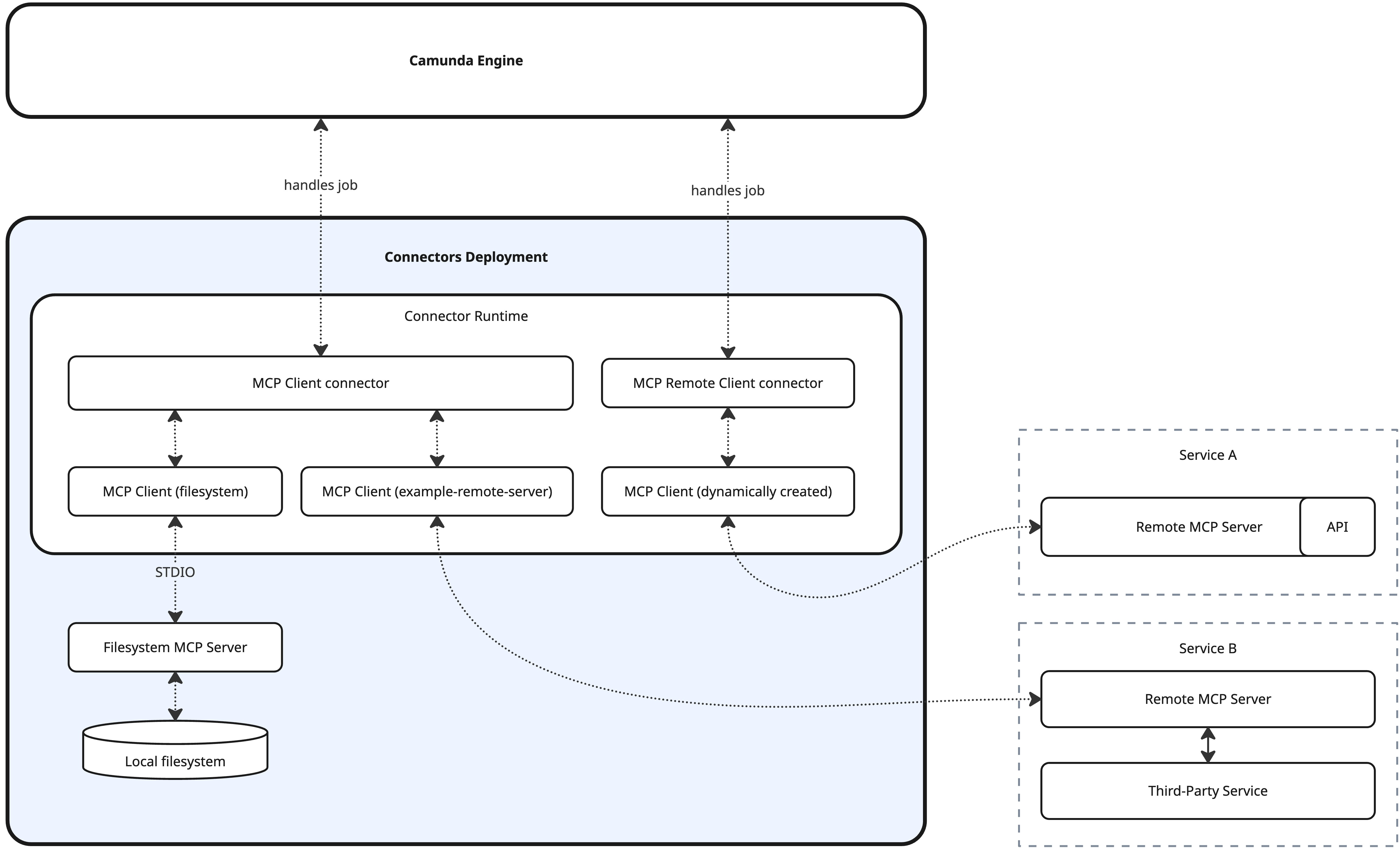
MCP Client connectors
Camunda provides two MCP connectors with distinct purposes.
| Connector | STDIO | Remote/HTTP | Configuration | Availability | Description |
|---|---|---|---|---|---|
| MCP Remote Client connector | Unsupported | Supported | Properties panel | Available on SaaS | Suitable for prototyping with remote MCP servers. Uses on-demand HTTP connections instead of persistent ones. |
| MCP Client connector | Supported | Supported | Connector runtime + properties panel | Not directly available on SaaS, but a custom runtime running the client connector can be connected to SaaS. | Flexible MCP integration based on persistent connections managed by the connector runtime. Supports STDIO MCP servers. |
The two connectors are not mutually exclusive and can be used together as long as your environment is configured accordingly.
Learn the fundamentals
Understand the fundamental concepts of the MCP Client.

Configure
Learn how to configure MCP Client connectors.

Tool discovery
Learn how AI agents automatically discover and invoke MCP client tools.

Human in the loop
Learn how to build human-in-the-loop AI workflows with MCP and BPMN.
Explore further resources
Dive into practical resources to see the MCP Client in action.