Amazon Textract connector
Integrate Amazon Textract to automatically extract document text and data in your BPMN service.
About this connector
Use this connector to orchestrate Amazon Textract-powered extraction as part of business processes that rely on documents. Using machine learning allows you to read and process any type of document, reducing manual work and increasing accuracy in document-centric processes.
The Amazon Textract machine learning (ML) service can automatically extract text, handwriting, layout elements, and data from scanned documents.
The Amazon Textract connector is available in the Camunda marketplace.
Prerequisites
The following prerequisites are required to use this connector:
| Prerequisite | Description |
|---|---|
| Amazon Web Services (AWS) IAM user and permissions |
|
For Amazon Textract setup instructions, refer to the Amazon Textract Developer Guide.
Use this connector
New to using an outbound connector? Learn how to add and use this type of connector, apply element templates, use connector secrets, handle results and errors, and more.
Authentication
Select an authentication type from the Authentication dropdown.
Credentials
Use AWS authentication.
| Property | Type | Required | Description | Example |
|---|---|---|---|---|
| Access Key | String | Yes | AWS access key for Textract. | AKIAIOSFODNN37 |
| Secret Key | String | Yes | AWS secret key for Textract. | wJalrXUtnFEgfMIK7MDENGbPxRfiCY |
Requires your AWS access key and secret access key (see prerequisites).
Default Credentials Chain (hybrid/Self-Managed only)
Use this authentication type if your system relies on implicit authentication (for example, IAM roles, environment variables, or credentials files). Uses the Default Credential Provider Chain to resolve credentials.
Configuration
Region
Configure the AWS region for this connector.
| Property | Type | Required | Description | Example |
|---|---|---|---|---|
| Region | String | Yes | Specify the AWS region where the Textract service and your S3 buckets are hosted. | us-east-1 |
Operations
Analyze Document
Analyze documents using Textract. Different input parameters are available depending on the Execution type you select.
Input parameters
| Property | Type | Required | Description | Example |
|---|---|---|---|---|
| Execution type | Dropdown | Yes | Specify the inference endpoint type:
| document |
| Document location | Dropdown | Yes | Where the document to be analyzed is stored: Amazon S3 or Uploaded document. Amazon S3 is best for most use-cases. | Amazon S3 |
| Document bucket | String | Yes for Amazon S3 | Name of the S3 bucket containing the document. Ensure proper permissions for Textract access. | automation-test |
| Document name | String | Yes for Amazon S3 | Full path from the bucket root to the document. | my-document.pdf |
| Document version | String | No | Specify if you need to process a specific document version. If not set, the latest version is used. | 5 |
| Output S3 Bucket | String | Yes for Asynchronous | The S3 bucket where Textract writes the analysis result for asynchronous execution. | automation-output |
When Document location is Uploaded document, use the Document source dropdown to select where that document comes from. Select one of the following options, then complete the field it reveals:
| Document source | Reveals field | Description |
|---|---|---|
| Camunda Document | Camunda document | Reference a document in the Camunda document store using a FEEL expression. Supports PNG and JPEG only, and only for real-time execution. |
| From URL | URL | Fetch the document from an external URL. |
Textract does not offer Inline Content as a document source, since it requires raw image/PDF bytes rather than the UTF-8 text bytes an inline document stores.
You must select at least one feature type. Combining multiple options can produce richer extraction results.
| Property | Type | Required | Description | Example |
|---|---|---|---|---|
| Analyze form | Boolean | No | Select this to return information about detected form data. | |
| Analyze signatures | Boolean | No | Select this to return the locations of detected signatures. | |
| Analyze layout | Boolean | No | Select this to return information about the layout of the document. | |
| Analyze queries | Boolean | No | Select this to return an answer to a query. | |
| Query | String | Yes, if analyze queries is true | The query to be applied to the document. | What is the IBAN in the invoice? |
Additional optional parameters for advanced configuration:
| Property | Type | Required | Description | Example |
|---|---|---|---|---|
| Response format | Dropdown | No | How the analysis result is returned: as JSON returns it directly in the process variables; Document reference uploads it to the Camunda document store and returns a reference. Not shown for Asynchronous execution, which always writes the result to the output S3 bucket. | Defaults to as JSON |
| Client Request Token | String | No | The idempotent token that you use to identify the start request. | |
| Job Tag | String | No | An identifier that you specify that's included in the completion notification published to the Amazon SNS topic. | |
| KMS Key ID | String | No | The KMS key used to encrypt the inference results. | |
| Notification Channel Role ARN | String | No | The Amazon SNS topic role ARN that you want Amazon Textract to publish the completion status of the operation to. | |
| Notification Channel SNS Topic ARN | String | No | The Amazon SNS topic ARN that you want Amazon Textract to publish the completion status of the operation to. |
Output
The connector response mirrors the AWS Textract API, depending on the execution type:
For Real-time and Polling execution, the Response format dropdown controls how that result reaches your process:
- as JSON (default) returns the result above directly in the process variables, unchanged from earlier template versions.
- Document reference uploads the result as a JSON file to the Camunda document store instead, and returns a reference:
{
  "document": {
    "storeId": "in-memory",
    "documentId": "8b54b413-b847-4650-b445-de963d5c506d",
    "contentHash": "ed0f7ad835669698a108a32b2a99e89e4f5aea84127fde68df4248b11197b0e5",
    "metadata": {
      "contentType": "application/json",
      "size": 2048,
      "fileName": "8b54b413-b847-4650-b445-de963d5c506d"
    },
    "camunda.document.type": "camunda"
  }
}
To get the answer of the query when using the Analyze queries feature:
= {"answer": response.blocks[item.blockType = "QUERY_RESULT"][1].text}
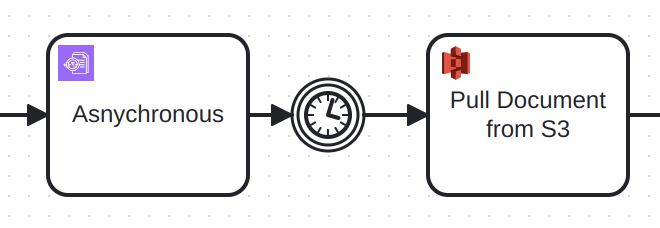
For example, to get the response, when using asynchronous execution, use a timer event for example and retrieve the result with the S3 connector.
Troubleshooting
To learn about general error handling in Camunda, see BPMN errors and failing jobs.
Further Resources
- Amazon Textract connector in the Camunda marketplace
- Amazon Textract Documentation