AI agents
Build and integrate AI agents into your end-to-end processes.
About AI agents
An AI agent is an addressable execution of an LLM-driven loop with shared memory context across iterations. An agent runs a loop where the model decides what to do next, which tools to invoke, and when to stop. The loop is what makes it an agent. A standalone LLM call with no loop and no autonomous tool selection, such as a single connector call that returns output along a fixed execution path, is not an agent.
AI agents can perform a variety of functions, including making decisions, solving problems, interacting with external environments, and taking actions.
Agent types
Camunda supports two types of agents:
- Camunda AI agents are native. They run their agent loop in Camunda's engine, which activates each tool call as a governed BPMN activity, maintains memory across iterations, and emits lifecycle events. They are implemented using the AI Agent connector, either as an AI Agent Sub-process or an AI Agent Task.
- External agents run their agent loop in an external runtime, such as, LangGraph, Amazon Bedrock, or custom code, instead of Camunda's engine.
Camunda represents every agent with an agent definition and agent instances.
The AI Agent connector
The AI Agent connector is the primary Camunda connector for building Camunda AI agents. It integrates an LLM with your BPMN process, enabling the agent to reason over context, select tools, and respond to users or process events.
Key capabilities include:
- LLM provider support: Connects to a range of providers, such as Anthropic, Amazon Bedrock, Google Gemini, and OpenAI.
- Tool calling: Exposes BPMN activities inside an ad-hoc sub-process as tools the LLM can select.
- Memory: Short-term conversational memory enables multi-turn interactions and follow-up questions within a process instance.
See the AI Agent connector documentation for full configuration details, implementation examples, and reference.
Integrate an AI agent into your process
The recommended approach for most use cases is to use the AI Agent Sub-process implementation due to its simplified configuration and support for event sub-processes.
In this approach, you integrate the agent using an ad-hoc sub-process and the AI Agent connector in an agent loop, where the agent understands the process goal and uses the available tools to complete it.
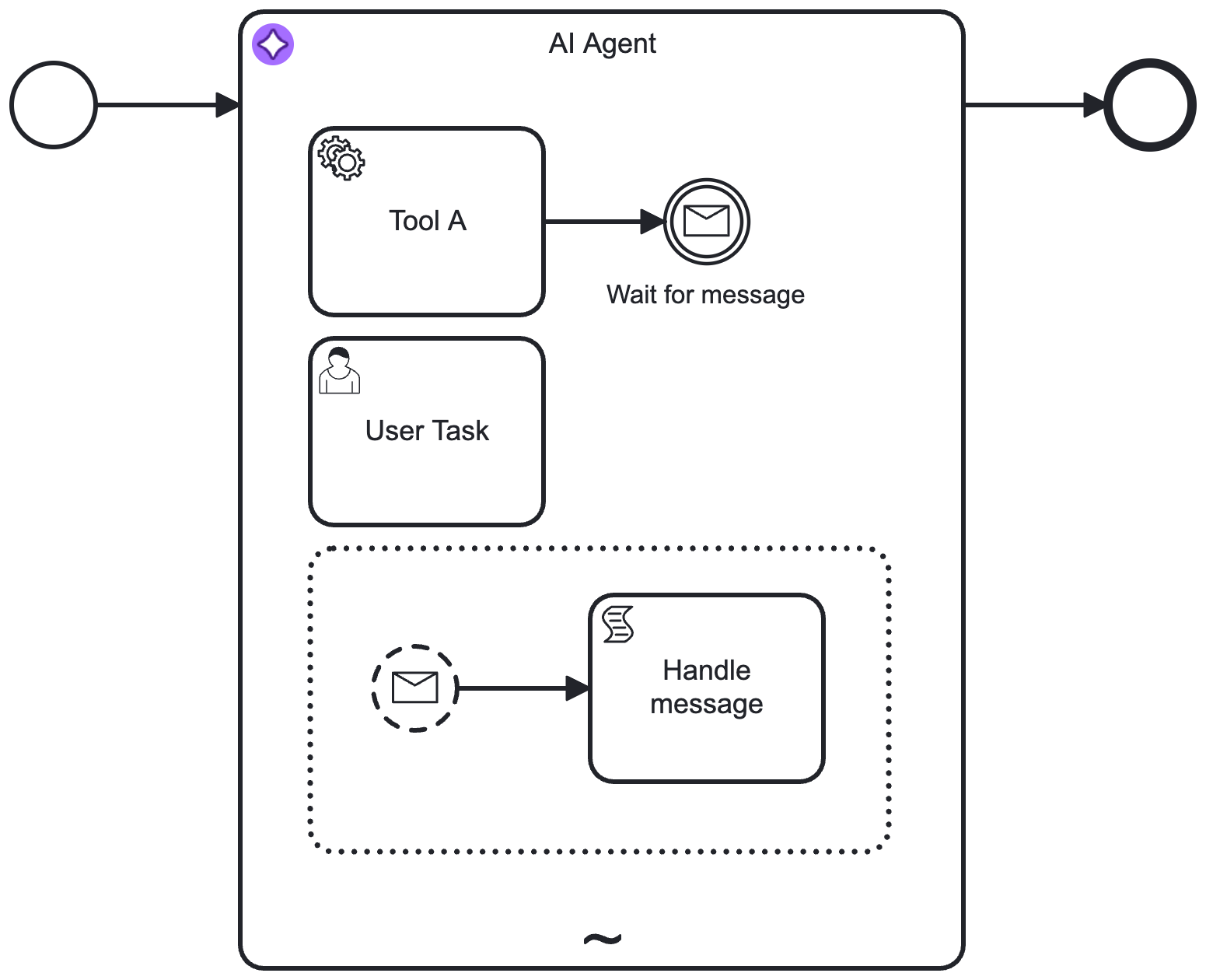
How the agent loop works
The AI Agent connector operates in an agent loop between the LLM and Camunda:
- A user prompt is sent to the connector. The LLM evaluates the prompt, the system prompt, and the available tool definitions.
- If the LLM determines that a tool call is needed, Camunda activates the corresponding BPMN activity in the ad-hoc sub-process.
- The tool result is passed back to the LLM, which decides whether more tool calls are needed.
- The loop continues until the LLM returns a final response, which can then be routed to the next step in the process.
Decision-making and execution are intentionally split:
- LLM decides: Which tool to call next, in what order, and with which parameters.
- Camunda orchestrates: Executes the selected BPMN activity, stores variables, applies retries and incident handling, and routes human tasks and events.
Learn more in the example AI Agent Sub-process connector integration and Add tools to an AI agent.
Example: an export compliance agent
Consider an export shipment process where the compliance details arrive as free text instead of pre-parsed fields, and a shipment must be checked before it can proceed. An AI agent extracts what it needs from the text and calls tools built from real connector calls:
- Verify genetic marker: a SQL query against a genetic marker database.
- Check destination country: a GraphQL query that resolves the destination to an ISO country code.
- Compute compliance score: a REST connector call that scores the shipment from the marker and country.
The agent extracts the marker and destination country from the shipment notes, decides which tools to call, and returns a decision. Camunda then applies deterministic routing: an exclusive gateway sends cleared shipments to an automatic notification, and flagged shipments to a human task for review.
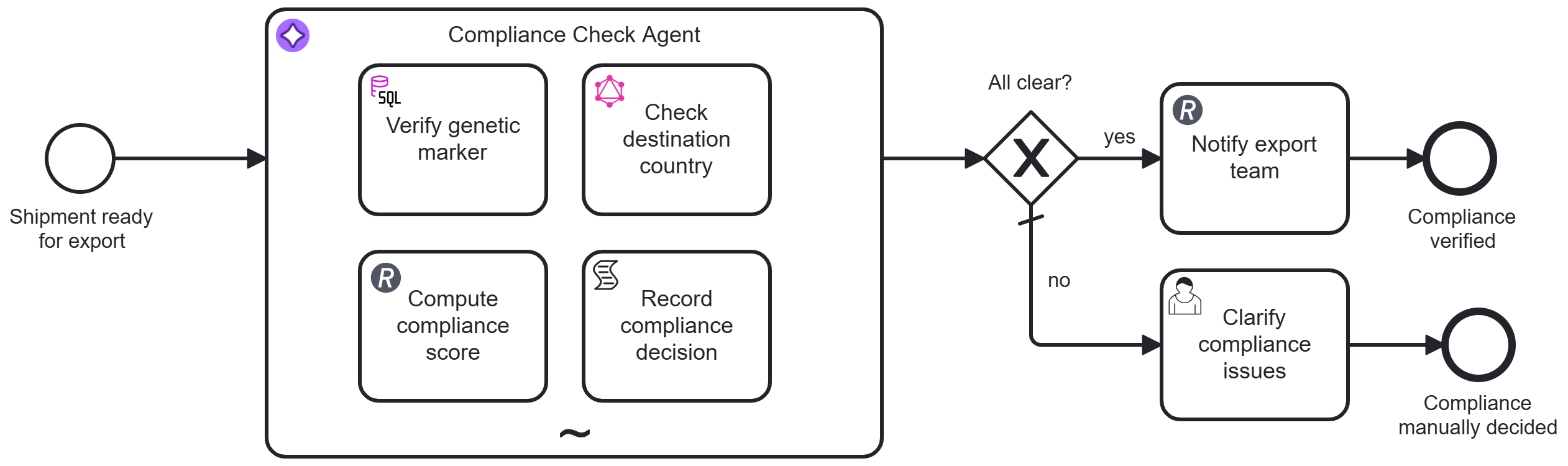
See the export compliance agent example for the full BPMN models and setup instructions.
AI agent integration features
Use the following Camunda 8 features to integrate AI agents into your processes:
| Feature | Description |
| Ad-hoc sub-process | A special kind of embedded BPMN subprocess with an ad-hoc marker that allows a small part of your process decision-making to be handed over to a human or agent. |
| AI Agent connector | Enables AI agents to integrate with an LLM to provide interaction/reasoning capabilities. This connector is designed for use with an ad-hoc sub-process in an agent loop, providing automated tool selection. |
| MCP Client connector | Connect an AI agent connector to tools exposed by Model Context Protocol (MCP) servers. |
| Ad-hoc tools schema resolver connector | Can be used independently with other AI connectors for direct LLM interaction. Use this connector if you don't want to use the AI agent connector but still want to resolve tools for an ad-hoc sub-process or debug tool definitions. |
| Vector database connector | Allows embedding, storing, and retrieving LLM embeddings. Use this connector to build AI-based solutions such as context document search, long-term memory for LLMs, and agentic AI interaction. |