Migrate from Bitnami subcharts to Kubernetes operators
Migrate a Camunda 8 Helm installation from Bitnami-managed infrastructure (PostgreSQL, Elasticsearch, and Keycloak) to Kubernetes operator-managed equivalents:
- CloudNativePG for PostgreSQL
- Elastic Cloud on Kubernetes (ECK) for Elasticsearch
- Keycloak Operator for Keycloak
After migration, your setup will be aligned with the operator-based reference architecture.
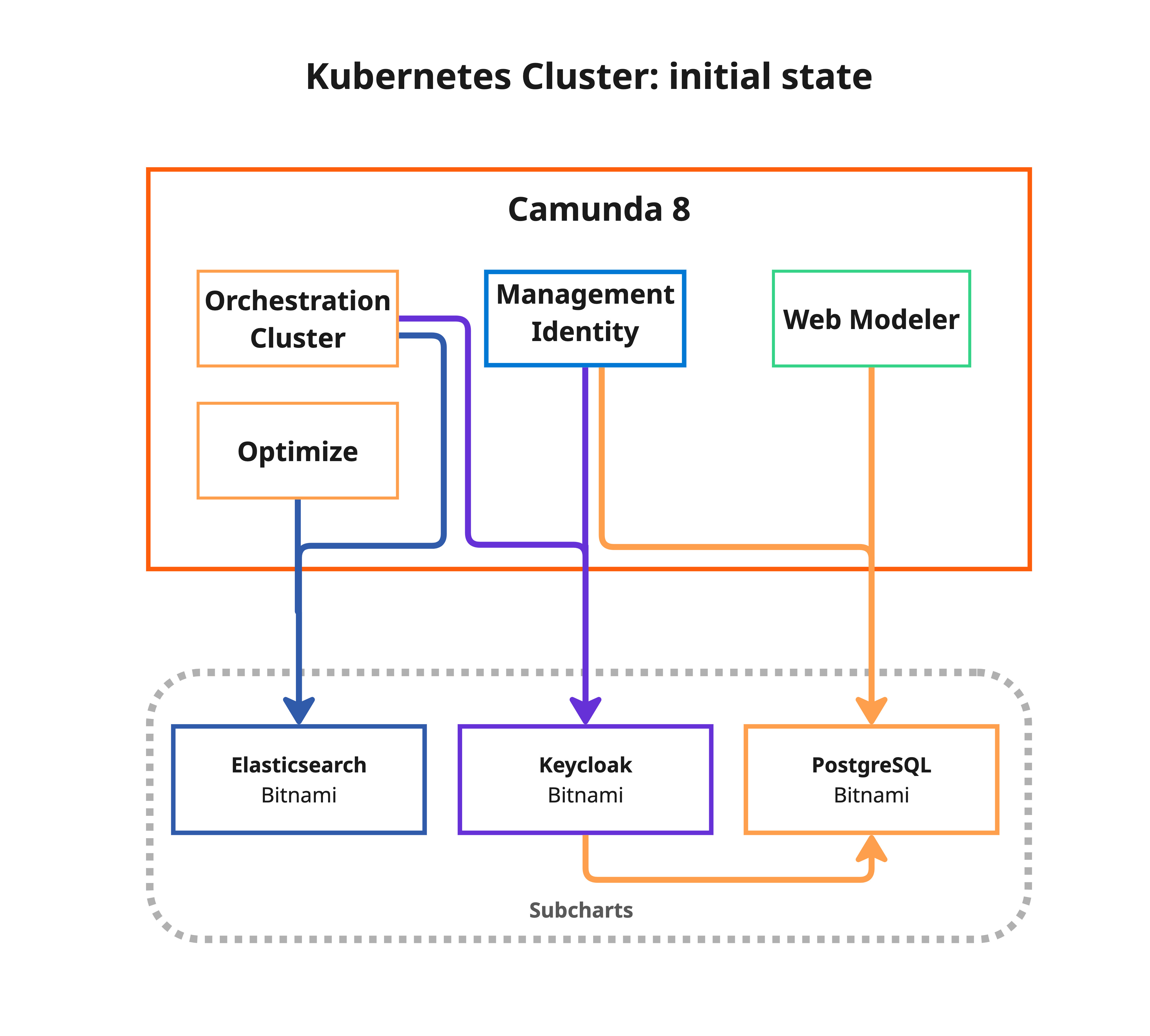
When to use this guide
This guide is intended for customers running Camunda 8 with Bitnami subcharts enabled. If your installation already uses external databases, managed services, or operator-managed infrastructure, you do not need to migrate from Bitnami subcharts.
Read the topic overview to learn why you should migrate.
Choose your migration strategy
Before starting, choose between the standard migration and the warm reindex strategy. This choice affects how Elasticsearch data is transferred and, therefore, how long the downtime window lasts.
- Standard
- Reduced downtime (warm reindex)
The standard migration performs all Elasticsearch data transfer during the cutover (Phase 3). Downtime scales linearly with Elasticsearch data volume, typically 5–60 minutes.
This is the simplest option and is recommended when:
- Your Elasticsearch data volume is small (< 1 GB) or moderate (< 10 GB).
- You can tolerate a longer maintenance window.
- You want the fewest moving parts.
| Phase | Description | Downtime |
|---|---|---|
| Phase 1 – Deploy targets | Install operators and create target clusters alongside Bitnami | No |
| Phase 2 – Initial backup | Back up all data while the application is still running | No |
| Phase 3 – Cutover | Freeze → final backup → full ES reindex → Helm upgrade | Yes (5–60 minutes typical) |
| Phase 4 – Validate | Verify all components are healthy on the new infrastructure | No |
| Phase 5 – Cleanup Bitnami | Remove old Bitnami resources and re-verify | No |
The warm reindex strategy pre-copies Elasticsearch data to the target during Phase 2, while the application is still running. At cutover, only a fast delta reindex is needed to sync changes written since Phase 2, significantly reducing the downtime window.
Choose this option when:
- Your Elasticsearch data volume is large (> 10 GB).
- You need to minimize the maintenance window.
- You can accept the additional complexity of a two-step ES migration.
To enable, set ES_WARM_REINDEX=true in env.sh.
| Phase | Description | Downtime |
|---|---|---|
| Phase 1 – Deploy targets | Install operators and create target clusters alongside Bitnami | No |
| Phase 2 – Initial backup | Back up all data + full ES reindex to target (while app runs) | No |
| Phase 3 – Cutover | Freeze → final backup → delta ES reindex → Helm upgrade | Yes (~5 minutes) |
| Phase 4 – Validate | Verify all components are healthy on the new infrastructure | No |
| Phase 5 – Cleanup Bitnami | Remove old Bitnami resources and re-verify | No |
Prerequisites
Before starting the migration, ensure you have the following general prerequisites:
- A running Camunda 8 installation using the Helm chart with Bitnami subcharts enabled
kubectlconfigured and pointing to your clusterhelmwith thecamunda/camunda-platformrepository added- Sufficient cluster resources to temporarily run both old and new infrastructure side-by-side
- A tested backup of your current installation (see Precautions)
Additionally, the migration scripts require:
envsubstavailable (usually included ingettext)jqinstalledyqinstalled (for selective CloudNativePG cluster deployment)base64andopensslavailable (used for credential management)
For the tool versions used and tested, check the .tool-versions file.
Precautions
Review the general precautions that apply to all migration paths.
Review the operational readiness checklist, including the staging rehearsal and pre-migration checklist, before starting a production migration.
Operator-specific precautions
These precautions are specific to the operator-based migration:
- Monitor resource quotas: CNPG and ECK clusters consume additional resources. Ensure your namespace quotas and node capacity allow for the temporary duplication.
- Elasticsearch
reindex.remote.whitelist: The target ECK cluster must havereindex.remote.whitelistconfigured to allow pulling data from the source Bitnami Elasticsearch via the_reindexAPI. The migration scripts patch this automatically. - Keycloak hooks: If you use a DNS CNAME for Keycloak, use the
hooks/post-phase-3.shhook to update the DNS target to the new Keycloak Operator service after cutover.
Clone the deployment references repository
The migration scripts are part of the Camunda deployment references repository. Clone the repository and navigate to the migration directory:
git clone --branch stable/8.9 https://github.com/camunda/camunda-deployment-references.git
cd camunda-deployment-references/generic/kubernetes/migration
The migration reuses the operator-based reference architecture scripts for deploying target infrastructure, ensuring consistency:
generic/kubernetes/
├── operator-based/                  # Reference architecture (reused by migration)
│   ├── postgresql/
│   │   ├── deploy.sh               #   CNPG operator + cluster deployment
│   │   ├── set-secrets.sh          #   PostgreSQL secret management
│   │   ├── postgresql-clusters.yml #   ★ CUSTOMIZE: PG cluster specs
│   │   ├── camunda-identity-values.yml
│   │   └── camunda-webmodeler-values.yml
│   ├── elasticsearch/
│   │   ├── deploy.sh               #   ECK operator + cluster deployment
│   │   ├── elasticsearch-cluster.yml #   ★ CUSTOMIZE: ES cluster specs
│   │   └── camunda-elastic-values.yml
│   └── keycloak/
│       ├── deploy.sh               #   Keycloak operator + CR deployment
│       ├── keycloak-instance-*.yml #   ★ CUSTOMIZE: Keycloak CR specs
│       ├── camunda-keycloak-domain-values.yml
│       └── camunda-keycloak-no-domain-values.yml
│
└── migration/                       # Migration scripts
    ├── env.sh                       # Configuration variables
    ├── lib.sh                       # Shared library (do not edit)
    ├── 1-deploy-targets.sh          # Phase 1: Deploy operators + clusters
    ├── 2-backup.sh                  # Phase 2: Initial backup
    ├── 3-cutover.sh                 # Phase 3: Freeze → Restore → Switch
    ├── 4-validate.sh                # Phase 4: Validate everything
    ├── 5-cleanup-bitnami.sh         # Phase 5: Remove old Bitnami resources
    ├── rollback.sh                  # Emergency rollback
    ├── .state/                      # Migration state tracking (auto-generated)
    ├── hooks/                       # Custom hook scripts (optional)
    ├── jobs/                        # Kubernetes Job templates
    │   ├── pg-backup.job.yml
    │   ├── pg-restore.job.yml
    │   ├── es-backup.job.yml        #   ES health verification
    │   └── es-restore.job.yml       #   ES reindex-from-remote restore
    └── manifests/
        ├── backup-pvc.yml           # Shared backup PVC
        └── eck-migration-patch.yml  # ES reindex.remote.whitelist patch
Step 1: Configure the migration
Edit env.sh to match your current Camunda installation:
Show details: env.sh reference
loading...
Key configuration variables
| Variable | Default | Description |
|---|---|---|
NAMESPACE | camunda | Kubernetes namespace of your Camunda installation |
CAMUNDA_RELEASE_NAME | camunda | Helm release name |
CAMUNDA_HELM_CHART_VERSION | (chart version) | Target Helm chart version for the upgrade |
CAMUNDA_DOMAIN | (empty) | Domain for Keycloak Ingress. Leave empty for port-forward setups |
IDENTITY_DB_NAME | identity | Identity database name on the target |
IDENTITY_DB_USER | identity | Identity database user on the target |
KEYCLOAK_DB_NAME | keycloak | Keycloak database name on the target |
KEYCLOAK_DB_USER | keycloak | Keycloak database user on the target |
WEBMODELER_DB_NAME | webmodeler | Web Modeler database name on the target |
WEBMODELER_DB_USER | webmodeler | Web Modeler database user on the target |
BACKUP_PVC | migration-backup-pvc | PVC name for storing backup data |
BACKUP_STORAGE_SIZE | 50Gi | Backup PVC size (must fit all database dumps) |
MIGRATE_IDENTITY | true | Enables the Identity PostgreSQL database migration |
MIGRATE_KEYCLOAK | true | Enables the Keycloak and its PostgreSQL database migration |
MIGRATE_WEBMODELER | true | Enables the Web Modeler PostgreSQL database migration |
MIGRATE_ELASTICSEARCH | true | Enables the Elasticsearch data migration |
ES_WARM_REINDEX | false | When true, pre-copies ES data during Phase 2 (no downtime), reducing Phase 3 to a ~5 minute delta sync. |
ES_INDEX_PREFIXES | zeebe-* operate-* tasklist-* optimize-* connectors-* camunda-* | Index patterns that identify your Camunda indices. Set this if your installation uses a custom index prefix. |
Set any MIGRATE_* variable to false to skip a component. This is useful, for example, if the component isn't deployed or already uses an external service.
Elasticsearch index prefixes
ES_INDEX_PREFIXES selects which Elasticsearch indices the migration lists, reindexes, and re-aliases. Indices outside these patterns are ignored without warning, so an installation using a custom index prefix migrates successfully while leaving that data behind.
Prefixes come from several independent settings, not one. orchestration.index.prefix covers the Orchestration Cluster indices, global.elasticsearch.prefix or global.opensearch.prefix covers the legacy zeebe-record indices, and Optimize carries its own through CAMUNDA_OPTIMIZE_ELASTICSEARCH_SETTINGS_INDEX_PREFIX or its OpenSearch equivalent. Work through configure Elasticsearch prefix indices and add every prefix your installation actually sets, since deriving the list from one setting alone leaves the other index families behind. Keep every default pattern as well as your custom ones: a pattern that matches no index is skipped harmlessly, while a missing pattern silently drops a whole index family.
# Defaults retained, custom Zeebe and Operate prefixes added
export ES_INDEX_PREFIXES="zeebe-* operate-* tasklist-* optimize-* connectors-* camunda-* my-prefix-zeebe-* my-prefix-operate-*"
Phase 2 logs the indices it matched. Check that list against _cat/indices on the source before starting the cutover.
Source and target database names
The *_DB_NAME and *_DB_USER variables above name the databases and roles the migration writes into. They do not have to match your Bitnami installation, because the source names are different by default:
| Component | Source name in a stock Helm installation | Target name created by the migration |
|---|---|---|
| Identity | identity | identity |
| Keycloak | bitnami_keycloak / bn_keycloak | keycloak |
| Web Modeler | web-modeler | webmodeler |
The migration scripts read the real source database and role from the Bitnami StatefulSet at runtime, so you don't need to configure them. Restores run with --no-owner --no-privileges, which is why a differing source role is not a problem.
Detection arrived with camunda-deployment-references#3511. Check your copy of env.sh before relying on it. Older copies default *_SOURCE_DB_NAME and *_SOURCE_DB_USER to the target names, so a stock installation backs up keycloak and webmodeler rather than the bitnami_keycloak and web-modeler the source actually serves, and the migration fails. If your env.sh still carries those defaults, set the overrides explicitly as shown below.
Override the detection only if your installation was renamed away from the chart defaults, or if you want to back up a different database:
| Variable | Default | Description |
|---|---|---|
IDENTITY_SOURCE_DB_NAME | (auto-detected) | Forces the source database name for Identity |
IDENTITY_SOURCE_DB_USER | (auto-detected) | Forces the source database user for Identity |
KEYCLOAK_SOURCE_DB_NAME | (auto-detected) | Forces the source database name for Keycloak |
KEYCLOAK_SOURCE_DB_USER | (auto-detected) | Forces the source database user for Keycloak |
WEBMODELER_SOURCE_DB_NAME | (auto-detected) | Forces the source database name for Web Modeler |
WEBMODELER_SOURCE_DB_USER | (auto-detected) | Forces the source database user for Web Modeler |
Operator-specific variables
These variables control the operator deployments. Defaults work for most setups:
| Variable | Default | Description |
|---|---|---|
CNPG_OPERATOR_NAMESPACE | cnpg-system | Namespace for the CloudNativePG operator |
ECK_OPERATOR_NAMESPACE | elastic-system | Namespace for the ECK operator |
CNPG_IDENTITY_CLUSTER | pg-identity | CNPG cluster name for Identity |
CNPG_KEYCLOAK_CLUSTER | pg-keycloak | CNPG cluster name for Keycloak |
CNPG_WEBMODELER_CLUSTER | pg-webmodeler | CNPG cluster name for Web Modeler |
ECK_CLUSTER_NAME | elasticsearch | ECK Elasticsearch cluster name |
Source env.sh
Once you've configured the environment variables, source the file:
source env.sh
Step 2: Customize operator manifests
Before running the migration, you must review and customize the operator-based manifests to match your production requirements. The migration deploys operators and instances using these manifests. The default settings may not be appropriate for your workload.
Follow this guidance while reviewing the manifests:
| Component | Must review before production | Defaults may be acceptable for |
|---|---|---|
| PostgreSQL | Storage size, replica count, CPU and memory, connection-related parameters | Short-lived staging rehearsals with representative data |
| Elasticsearch | Node count, storage size, JVM and resource limits | Dry runs where you only validate the workflow |
| Keycloak | Hostname, Ingress or route mode, replica count, resource limits | Non-production validation only |
If you are rehearsing the migration for the first time, keep the manifests simple but ensure storage is at least as large as the existing Bitnami volumes. Before production, revisit the sizing based on the timings and load observed during rehearsal.
PostgreSQL (CloudNativePG)
Review the CloudNativePG (CNPG) cluster specifications in operator-based/postgresql/postgresql-clusters.yml. Key settings to verify:
- Storage size (must be >= your current Bitnami PVC sizes)
- Number of replicas
- PostgreSQL version
- Resource requests and limits
- PostgreSQL parameters (for example,
shared_buffersandmax_connections)
CloudNativePG is the example this guide deploys, not a requirement. If you already run a different PostgreSQL operator such as StackGres, Crunchy, or Zalando, keep it: set PG_TARGET_MODE=external so the migration never installs CNPG, create the target databases with your own operator, and point the migration at them. The scripts treat any non-operator target the same way, whether it is a cloud-managed service or a database you run yourself, so follow configure the migration for external targets for the connection variables.
Show details: CloudNativePG manifest reference
loading...
Elasticsearch (ECK)
The migration patches the reference ECK cluster manifest from operator-based/elasticsearch/elasticsearch-cluster.yml at runtime to add reindex.remote.whitelist support for data transfer via the _reindex API. Review the base manifest:
- Node count
- Storage size (must be >= your current Bitnami ES PVC size)
- Resource requests and limits
Elasticsearch version compatibility
Phase 1 compares the Elasticsearch version of your source installation against spec.version in the ECK manifest, and stops the migration if the two are incompatible:
| Source to target | Result |
|---|---|
| Same version | Allowed |
| Same minor, higher patch (8.18.0 to 8.18.3) | Allowed |
| Same minor, lower patch (8.18.3 to 8.18.0) | Blocked, downgrade |
| Newer minor, same major (8.18.0 to 8.19.20) | Allowed, logged as an upgrade |
| Older minor (8.19.0 to 8.18.0) | Blocked, downgrade |
| Different major (8.x to 7.x, or 8.x to 9.x) | Blocked |
In short, the target must share the major version of your source and be the same version or newer. A target carrying no patch component counts as patch 0, so 8.18.1 to 8.18 is a downgrade rather than a match.
The target is allowed to be ahead of the source within the same major version, because reindex from remote reads an older source into a newer target.
This matters in practice. The Camunda Helm chart pins Elasticsearch 8.18.0, while the ECK manifest in the deployment references tracks the latest 8.19 patch, so a stock installation always migrates upward. You cannot close that gap from the source side: no 8.19 image was published to the archived bitnamilegacy registry, where 8.18.0 is the highest 8.x tag.
Show details: Elasticsearch manifest reference
loading...
Keycloak
Review the Keycloak Custom Resource in operator-based/keycloak/. For the broader deployment context and Helm values layering, see operator-based infrastructure. Choose the appropriate variant:
keycloak-instance-domain-nginx.yml— if you have a domain with nginx Ingresskeycloak-instance-domain-openshift.yml— for OpenShift deployments with Routeskeycloak-instance-no-domain.yml— for port-forward setups
Key settings to verify:
- Replicas
- Resource limits
- Hostname configuration
The Keycloak Custom Resource uses the v2 hostname provider (Keycloak 25+). The hostname field must include the full URL with scheme and path — for example, https://your-domain.example.com/auth. This ensures that the OIDC issuer URL is consistent and includes the /auth path prefix used by http-relative-path. The v1 hostname provider (Keycloak 24 and earlier) is not compatible with these manifests.
Step 3: Run the migration
The migration follows five sequential phases. Each phase is idempotent and can, therefore, be rerun safely.
Phase 1: Deploy target infrastructure (no downtime)
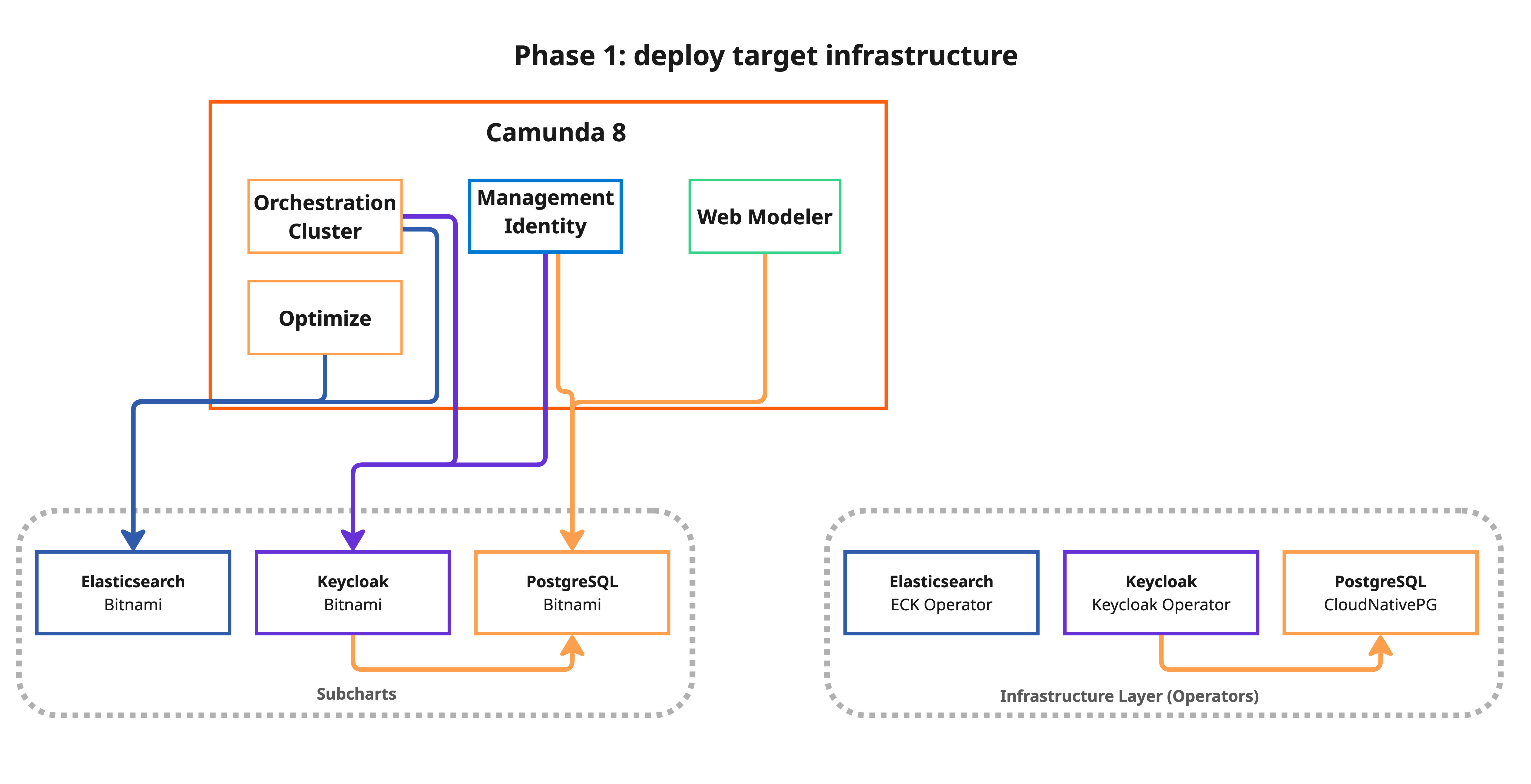
This phase installs the Kubernetes operators and creates the target clusters alongside your existing Bitnami components. Your application continues to run normally:
bash 1-deploy-targets.sh
What happens:
- The script displays a customization warning and asks for confirmation.
- It validates target resource allocations (CPU, memory, and PVC sizes) against your current Bitnami StatefulSets.
- It installs the CloudNativePG operator and creates PostgreSQL clusters for each component.
- It installs the ECK operator and creates an Elasticsearch cluster with
reindex.remote.whitelistconfigured for data migration via the_reindexAPI. - It installs the Keycloak Operator and creates the Keycloak Custom Resource.
The script only deploys operators for components that are being migrated. For example, if MIGRATE_ELASTICSEARCH=false, the ECK operator is not installed.
All targets are created empty; no traffic is routed to them yet.
Show details: Phase 1 script reference
loading...
Phase 2: Initial backup (no downtime)
- Standard
- Reduced downtime (warm reindex)
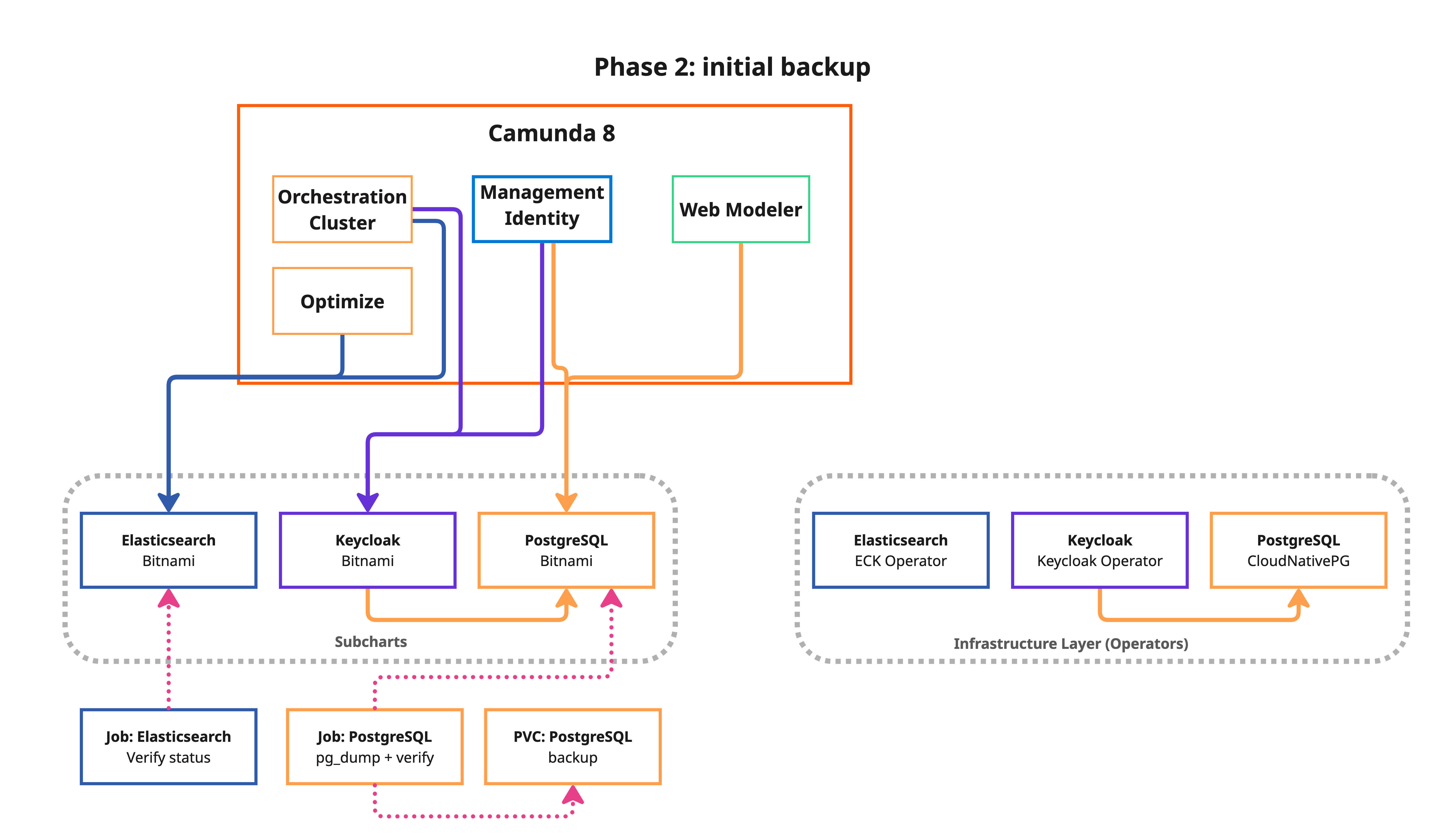
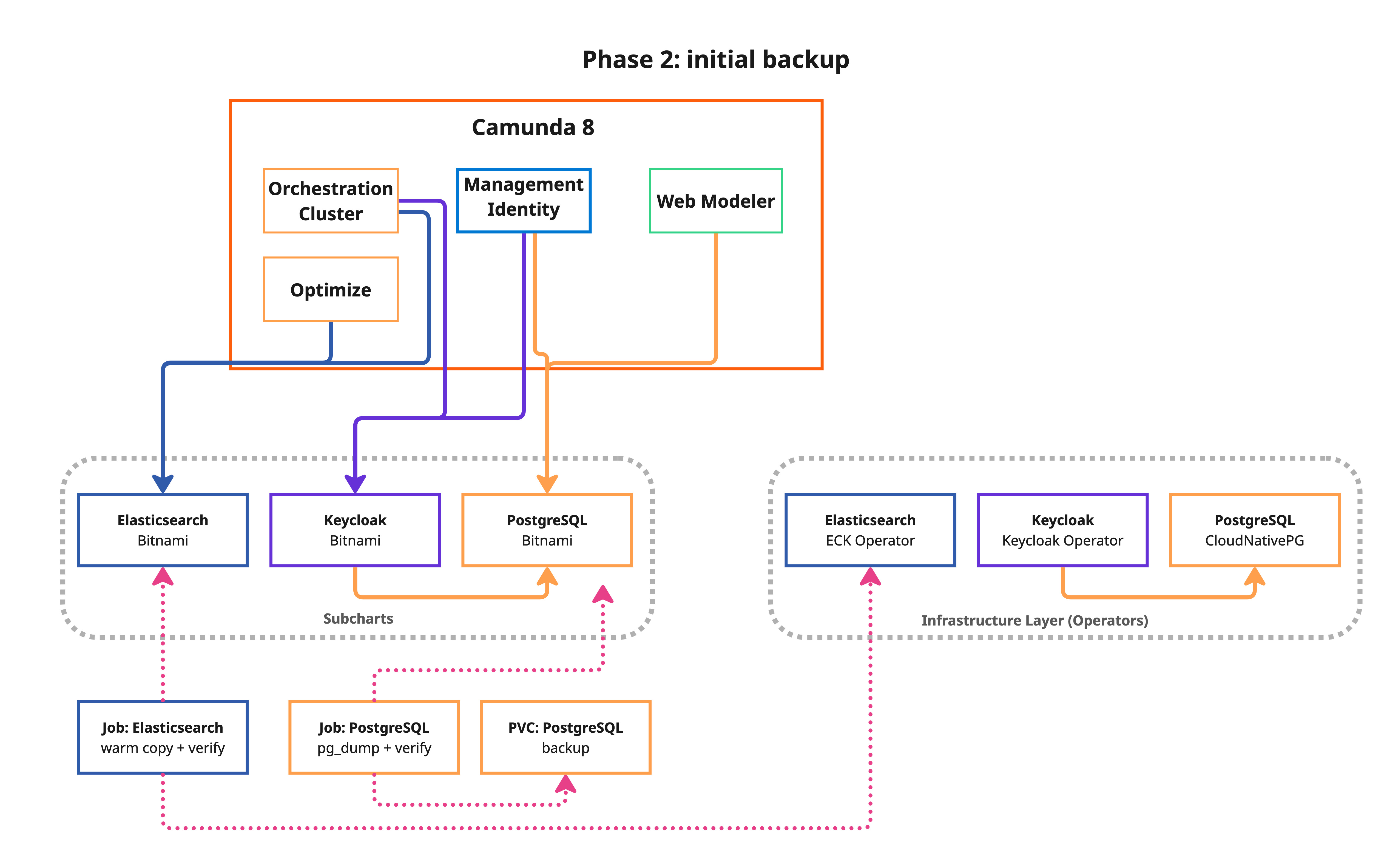
This phase takes a backup of all data sources while the application is still running. This reduces the cutover window in Phase 3.
bash 2-backup.sh
- Standard
- Reduced downtime (warm reindex)
What happens:
- PostgreSQL: A
pg_dumpKubernetes Job is created for each component (Identity, Keycloak, and Web Modeler). - Elasticsearch (ES): A verification job checks source ES health and lists all Camunda indices to be migrated.
- All backup data is stored on a shared Persistent Volume Claim (PVC).
What happens:
- PostgreSQL: A
pg_dumpKubernetes Job is created for each component (Identity, Keycloak, and Web Modeler). - Elasticsearch (ES): A verification job checks source ES health and lists all Camunda indices to be migrated.
- Elasticsearch warm reindex: A full reindex from the source Bitnami ES to the target is performed while the application is still running. This pre-populates the target with all existing data so Phase 3 only needs a fast delta reindex. The warm reindex may take a significant amount of time depending on your data volume, but it runs without any downtime.
- All backup data is stored on a shared Persistent Volume Claim (PVC).
Reference templates used in this phase:
Show details: PostgreSQL backup job template
loading...
Show details: Elasticsearch verification job template
loading...
Show details: Phase 2 script reference
loading...
Phase 3: Cutover (downtime required)
- Standard
- Reduced downtime (warm reindex)
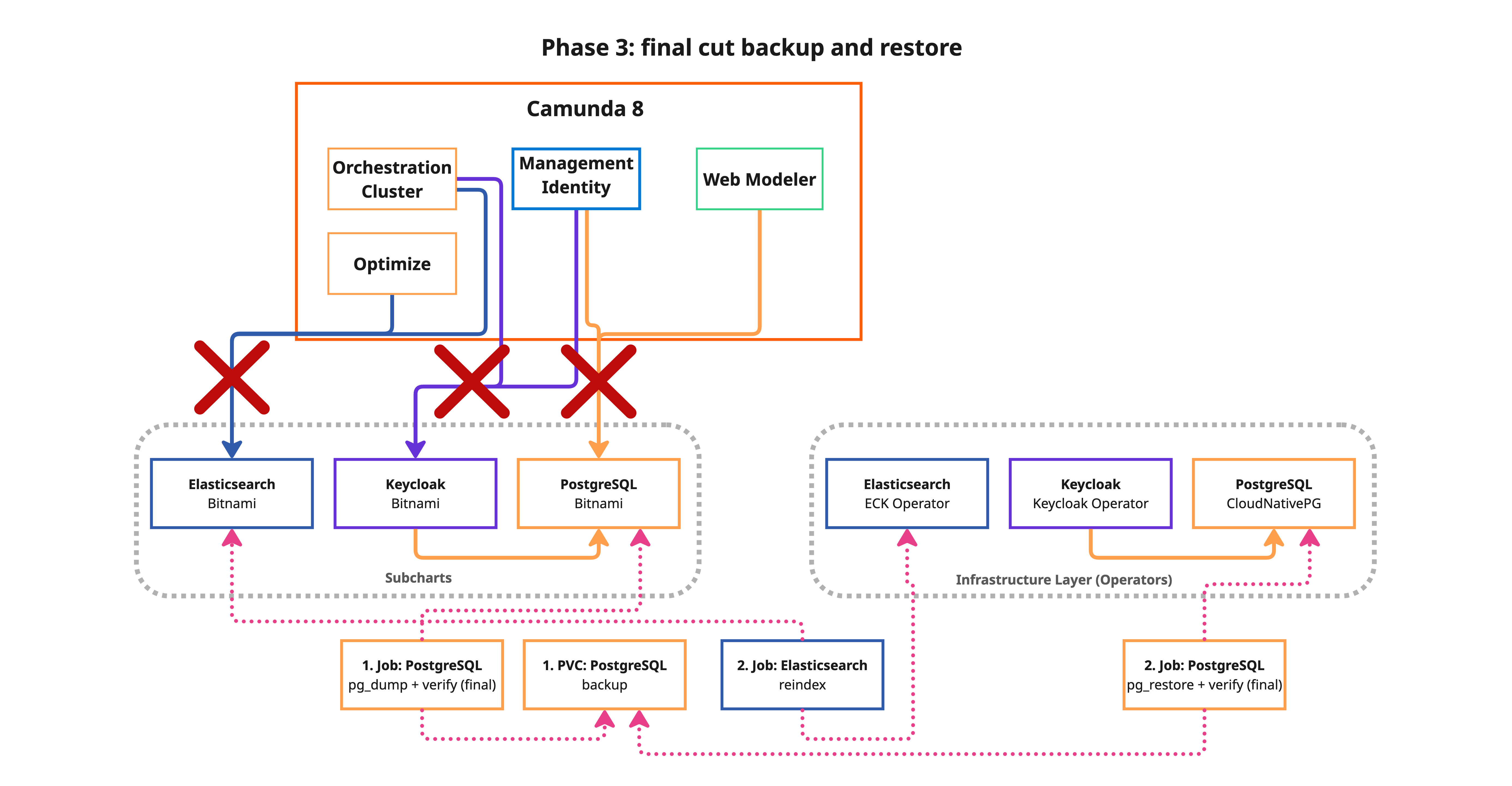
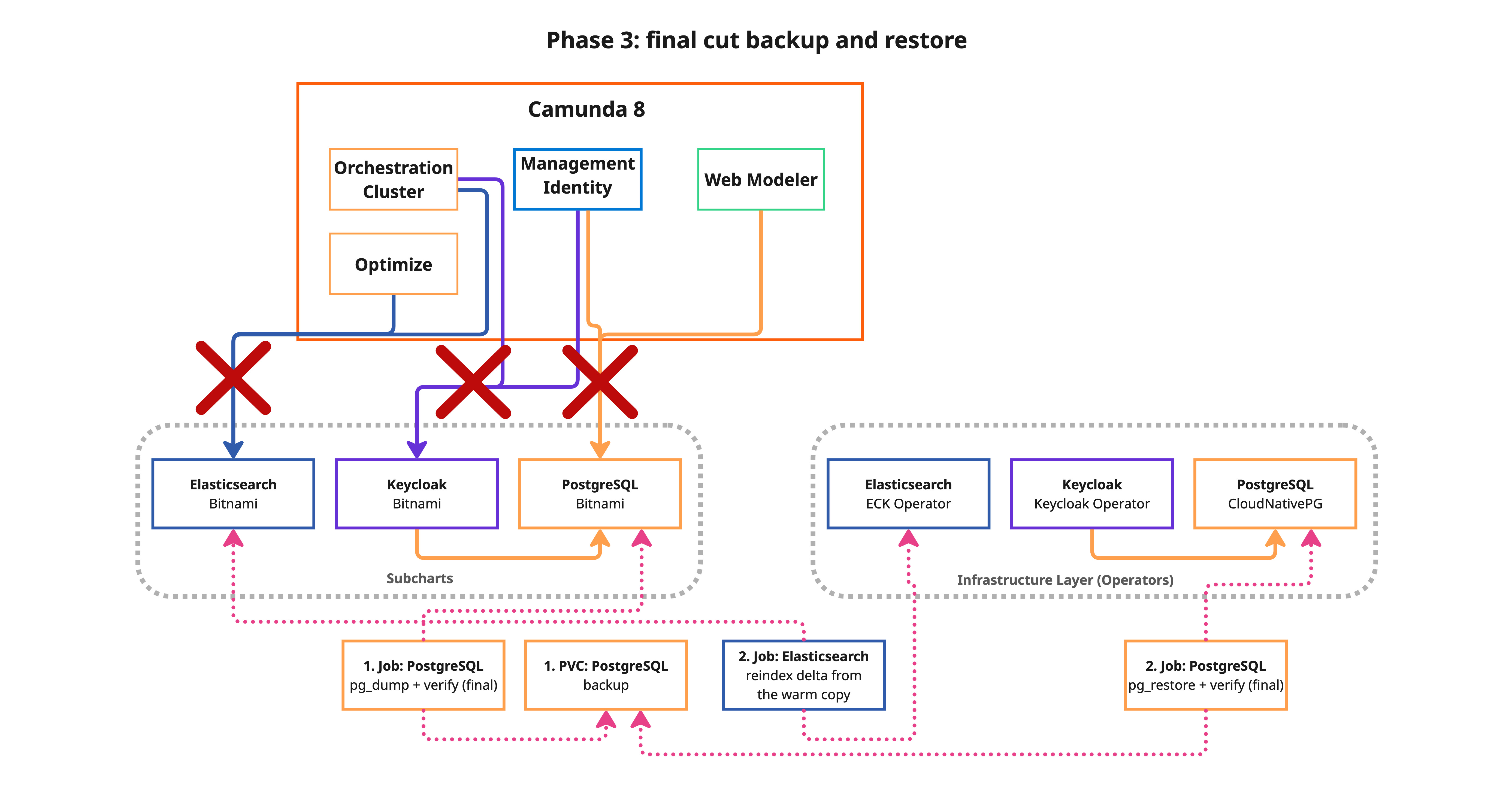
This is the only phase that causes downtime. Schedule a maintenance window before proceeding.
- Standard
- Reduced downtime (warm reindex)
Downtime typically lasts 5–60 minutes, depending on Elasticsearch data volume. See downtime estimation for benchmarked timings.
With ES_WARM_REINDEX=true, downtime is reduced to ~5 minutes regardless of Elasticsearch data volume. Phase 3 only syncs the delta written since the warm reindex in Phase 2.
You can run bash 3-cutover.sh --estimate to measure the actual cutover duration on your environment without causing any downtime. This runs the real data operations (PG backup/restore and ES reindex) against the target infrastructure but skips freezing the application and the Helm upgrade. See Measure with --estimate for details.
bash 3-cutover.sh
- Standard
- Reduced downtime (warm reindex)
What happens:
- Save current Helm values for rollback.
- Freeze all Camunda deployments and StatefulSets (scale to zero replicas).
- Final backup — consistent backup with no active connections to ensure data integrity.
- Restore data to the new operator-managed targets:
pg_restoreto CNPG clusters for each PostgreSQL database.- Elasticsearch full reindex from remote — all indices are copied from the source Bitnami ES to the ECK cluster using the
_reindexAPI. This is the dominant factor in downtime duration.
- Sync Keycloak admin credentials — copies the restored admin password to the Keycloak Operator secret so Keycloak and Identity stay in sync.
- Helm upgrade — reconfigures Camunda to use the new backends and restarts all components.
What happens:
- Save current Helm values for rollback.
- Freeze all Camunda deployments and StatefulSets (scale to zero replicas).
- Final backup — consistent backup with no active connections to ensure data integrity.
- Restore data to the new operator-managed targets:
pg_restoreto CNPG clusters for each PostgreSQL database.- Elasticsearch delta reindex — only documents written between Phase 2 (warm reindex) and the freeze are synced. This uses
version_type=externalwithconflicts=proceedto skip documents already present on the target, making it dramatically faster than a full reindex.
- Sync Keycloak admin credentials — copies the restored admin password to the Keycloak Operator secret so Keycloak and Identity stay in sync.
- Helm upgrade — reconfigures Camunda to use the new backends and restarts all components.
Reference templates used in this phase:
Show details: PostgreSQL restore job template
loading...
Show details: Elasticsearch restore job template
loading...
Show details: Phase 3 script reference
loading...
Phase 4: Validate (no downtime)
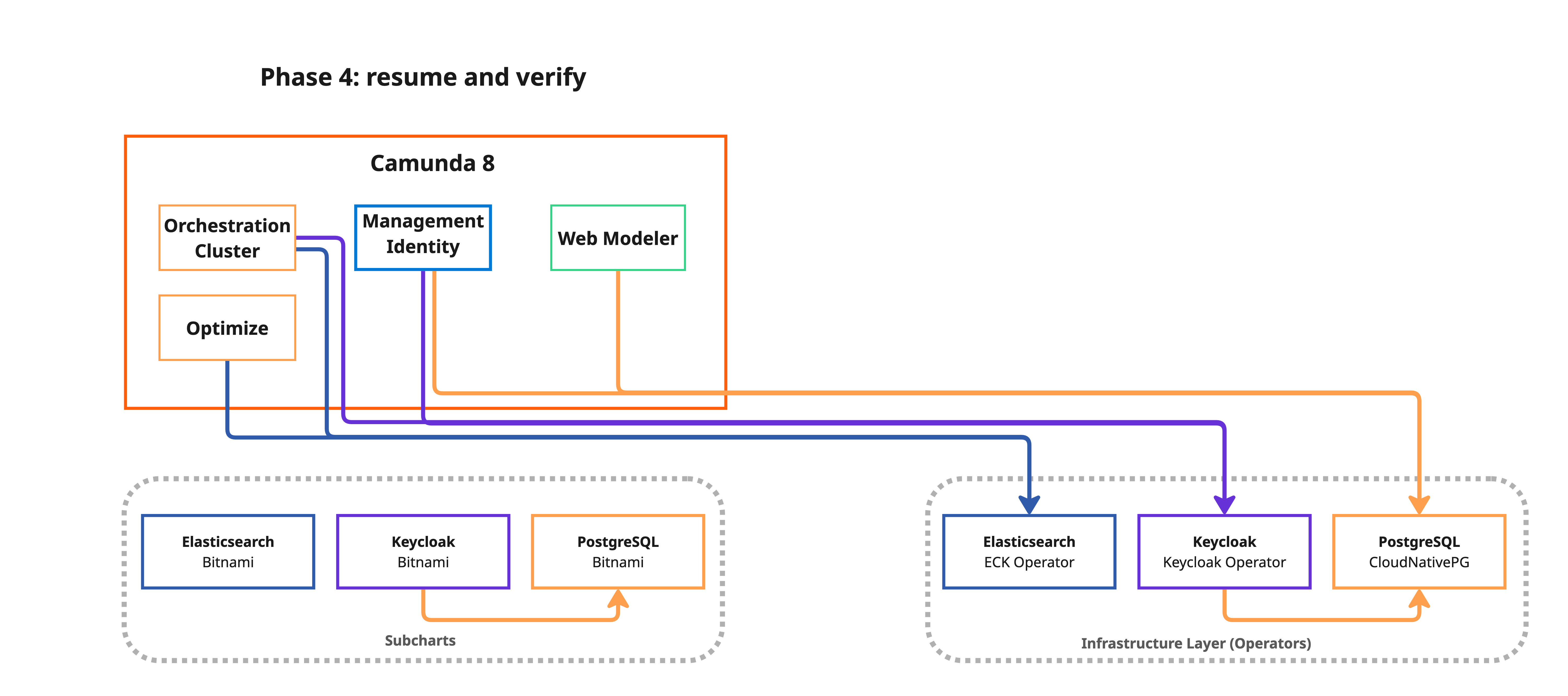
bash 4-validate.sh
This phase verifies all components are healthy:
- All Camunda deployments and StatefulSets are ready.
- CNPG PostgreSQL clusters report a healthy state.
- ECK Elasticsearch cluster is in
Readyphase with restored indices. - Keycloak Custom Resource is ready.
- A migration report is generated at
.state/migration-report.md.
Show details: Phase 4 script reference
loading...
Do not move on to the next phase immediately after validation. Operate with the new infrastructure through at least one full business cycle (for example, a complete weekday with peak traffic) to confirm stability. Once Bitnami resources are deleted, rollback is no longer possible without restoring from backup. If you need to fail back, run bash rollback.sh before this phase (see rollback).
Phase 5: Cleanup Bitnami resources (no downtime)
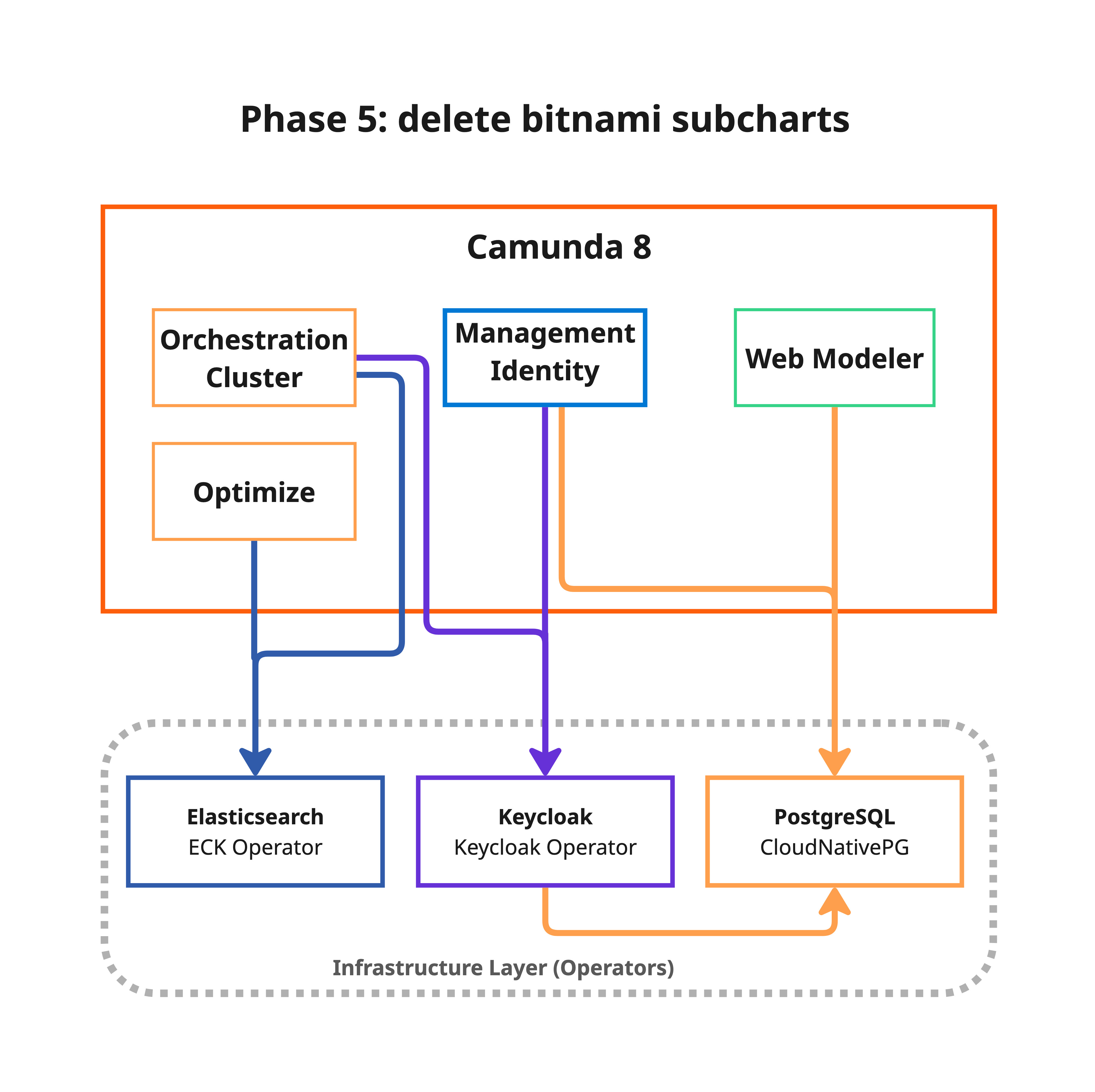
This phase permanently deletes old Bitnami StatefulSets, PVCs, and the migration backup PVC. After cleanup, rollback to Bitnami subcharts is no longer possible.
Before running this phase, strongly consider:
- Taking a full backup of all databases (
pg_dumpallor equivalent) - Taking PVC or storage volume snapshots (cloud provider snapshots)
- Storing backups in cold storage—for example, S3 Glacier or GCS Archive
- Keeping rollback artifacts in
.state/as a safety net
After confirming the migration is successful, remove old Bitnami StatefulSets, PVCs, services, and the migration backup PVC:
bash 5-cleanup-bitnami.sh
What happens:
- The script requires Phase 4 to be completed and displays a destructive operation warning with a confirmation prompt.
- Deletes old Bitnami PostgreSQL StatefulSets, their PVCs, and headless services (for each migrated component: Identity, Keycloak, and Web Modeler).
- Deletes old Bitnami Elasticsearch StatefulSet, PVCs, and services.
- Deletes old Bitnami Keycloak StatefulSet.
- Deletes the migration backup PVC.
- Reverifies that all Camunda components and operator-managed targets remain healthy after cleanup.
- Suggests removing the
reindex.remote.whitelistsetting from the ECK Elasticsearch configuration as a post-cleanup step.
The script checks whether each resource exists before attempting deletion, so it can be safely rerun if interrupted.
Show details: Phase 5 script reference
loading...
Migration hooks
The migration scripts support custom hooks that run before or after each phase. See migration hooks for the full reference and examples.
Rollback
If the migration fails or produces unexpected results, you can roll back to the pre-cutover state:
bash rollback.sh
This restores the previous Helm values (re-enabling Bitnami subcharts) and restarts Camunda on the original infrastructure. The operator-managed resources (CNPG clusters, ECK, and Keycloak Custom Resource) are not deleted, allowing you to retry or debug.
Show details: Rollback script reference
loading...
Rollback is available after Phase 3 (cutover). Before that, simply stop the migration; your Bitnami infrastructure is still active and untouched.
Downtime estimation
Only Phase 3 (cutover) causes downtime. The estimates below were measured on minimal Kubernetes clusters with standard storage. Production clusters with faster storage and networking will perform significantly better. Always run a staging rehearsal with representative data volumes to measure your actual downtime.
- Standard
- Reduced downtime (warm reindex)
Reference timings
The following timings were observed migrating a Camunda 8 installation with all components (Identity, Keycloak, Web Modeler, and Elasticsearch):
| Data profile | ES data | PG data (3 databases) | Observed downtime |
|---|---|---|---|
| Minimal (fresh install) | < 100 MB | ~30 MB | ~4 min |
| Large (~6.5 million ES docs) | ~9 GB | ~30 MB | ~40 min |
Phase 3 breakdown
| Step | Duration | Notes |
|---|---|---|
| Freeze components (scale → 0) | ~10 s | Scale down all deployments and StatefulSets |
| PostgreSQL backup + restore | ~40 s | pg_dump / pg_restore for all databases (usually negligible at moderate sizes) |
| Elasticsearch reindex | ~38 min | (Dominant factor) Copies all indices via the _reindex API |
| Helm upgrade + restart | ~2 min | Reconfigure backends and restart all components |
Estimates by Elasticsearch data volume
| ES Data Volume | Estimated Downtime | Bottleneck |
|---|---|---|
| < 1 GB | ~5 minutes | Helm upgrade + pod startup |
| 1–10 GB | ~10–40 minutes | ES reindex |
| 10–50 GB | ~40 minutes–2 hours | ES reindex |
| > 50 GB | 2+ hours | ES reindex |
Key observations
- Elasticsearch reindex dominates downtime. With ~9 GB of ES data, the reindex step accounts for ~95% of the total cutover time. PostgreSQL backup and restore completes in under a minute regardless of reasonable data sizes.
- Downtime scales linearly with ES data volume. The largest indices — such as Optimize process instance history — drive the overall duration.
- Your cluster will likely be faster. These timings were measured on constrained test infrastructure. Production clusters with NVMe storage, dedicated nodes, and higher network bandwidth typically achieve much higher reindex throughput.
- Always measure in staging. Run the full migration on a staging environment with representative data volumes to get an accurate downtime estimate for your specific setup.
Reference timings
With ES_WARM_REINDEX=true, the bulk of the Elasticsearch data transfer happens during Phase 2 (no downtime). Phase 3 only needs a fast delta reindex to sync documents written between Phase 2 and the freeze:
| Data profile | ES data | PG data (3 databases) | Observed downtime |
|---|---|---|---|
| Minimal (fresh install) | < 100 MB | ~30 MB | ~4 min |
| Large (~6.5 million ES docs) | ~9 GB | ~30 MB | ~5 min (delta only) |
Phase 3 breakdown (warm reindex)
| Step | Duration | Notes |
|---|---|---|
| Freeze components (scale → 0) | ~10 s | Scale down all deployments and StatefulSets |
| PostgreSQL backup + restore | ~40 s | pg_dump / pg_restore for all databases |
| ES delta reindex | ~1–2 min | Only documents written after Phase 2 warm reindex need to be synced |
| Helm upgrade + restart | ~2 min | Reconfigure backends and restart all components |
Estimates by Elasticsearch data volume
| ES Data Volume | Standard downtime | Warm reindex downtime | Notes |
|---|---|---|---|
| < 1 GB | ~5 minutes | ~5 minutes | No significant benefit at small volumes |
| 1–10 GB | ~10–40 minutes | ~5 minutes | Warm reindex eliminates the bottleneck |
| 10–50 GB | ~40 minutes–2 hours | ~5 minutes | Most impactful reduction |
| > 50 GB | 2+ hours | ~5 minutes | Critical for large data volumes |
- ES delta reindex is nearly instant. After the warm reindex pre-copies all existing data in Phase 2, only new documents created between Phase 2 and the freeze need to be synced. The delta reindex uses
version_type=externalandconflicts=proceedto efficiently skip up-to-date documents. - Downtime becomes data-volume independent. The dominant factor (ES reindex) is removed from the critical path. Downtime is determined by the freeze, PG restore, and Helm upgrade steps (~5 minutes total).
- Phase 2 takes longer. The warm reindex adds runtime to Phase 2 proportional to your ES data volume, but this runs without any downtime.
Measure with --estimate
You can measure the actual cutover duration on your environment without causing any downtime:
# After completing Phases 1 and 2:
bash 3-cutover.sh --estimate
This runs the real PG backup/restore and ES reindex operations against the target infrastructure but skips freezing the application and the Helm upgrade. The application remains fully operational throughout.
Use this to:
- Measure real timing with your actual data volumes before scheduling a maintenance window.
- Validate ES reindex throughput on your cluster hardware (storage, network, CPU).
- Compare standard vs. warm reindex — run Phase 2 once without
ES_WARM_REINDEX, estimate withbash 3-cutover.sh --estimate, then enableES_WARM_REINDEX=true, rerun Phase 2, and estimate again.
The estimate does not mark Phase 3 as complete, so you can run the real cutover afterwards with bash 3-cutover.sh.
The estimate restores data to the target backends (CNPG, ECK, or managed services). This is harmless — the real cutover overwrites with the final consistent backup taken after freezing the application.
Operational readiness
Before running this migration in production, use the checklist below to reduce risk and confirm the cutover plan is ready.
Staging rehearsal
- Clone your production environment to a staging cluster with the same Helm chart version, same component configuration, and comparable data volumes.
- Run the full migration end to end in staging, including all five phases: deploy, backup, cutover, validate, and cleanup.
- Measure actual timings: record how long each phase takes, especially the
3-cutover.shphase, as it determines your downtime window. The benchmarked timings show that Elasticsearch reindex dominates. Expect downtime to scale linearly with your ES data volume. - Test rollback: after a successful staging migration, intentionally run
bash rollback.shto verify you can revert cleanly.
Use a representative data set; empty databases migrate in seconds but do not reveal the Elasticsearch reindex bottleneck that large datasets will. As a reference, ~9 GB of ES data takes ~40 min on minimal test infrastructure, whereas production clusters with faster storage and networking will perform significantly better.
Production dry-run
The migration scripts support a --dry-run flag that shows what would be executed without making changes:
bash 1-deploy-targets.sh --dry-run
bash 2-backup.sh --dry-run
bash 3-cutover.sh --dry-run
Review the output carefully. Ensure that all Kubernetes resources, secrets, and Helm values match your expectations before removing --dry-run.
Pre-migration checklist
Before starting the migration in production:
- Notify stakeholders: announce the maintenance window at least 48 hours in advance. Include expected start time, duration (measured in staging), and impact on end users.
- Verify backups: confirm your existing backup strategy (Velero, volume snapshots, or cloud provider backups) has a recent successful backup. The migration creates its own backup, but an independent one provides an additional safety net.
- Scale down non-essential consumers: if you have external systems consuming Camunda APIs, consider pausing them during the freeze window to prevent data inconsistencies.
- Check cluster resources: ensure the cluster has enough CPU, memory, and storage to run both old and new infrastructure simultaneously during the migration—both exist briefly.
- Review
env.sh: double-check all variables, especiallyNAMESPACE,CAMUNDA_RELEASE_NAME,PG_TARGET_MODE, andES_TARGET_MODE. - Monitor readiness: have dashboards open for cluster health, pod status, and storage capacity.
Failback procedure
If the migration succeeds but you discover issues in the hours or days following:
- Immediate failback (before Phase 5 when Bitnami PVCs still exist): run
bash rollback.shto revert the Helm values and re-attach to the original Bitnami StatefulSets. - Late failback (after Phase 5 when Bitnami PVCs have been deleted): restore from the backup taken during Phase 2 or from your independent backup.
Once you delete the old Bitnami PVCs (during post-migration cleanup), rollback is no longer trivial. Keep the old resources until your team has observed the system under production load through at least one full business cycle (for example, a complete weekday with peak traffic). Only proceed with cleanup once you are confident the new infrastructure is stable.
Data safety measures
- All
pg_dumpbackups are stored on a dedicated PVC (migration-backup-pvc) that persists independently of the migration. - Elasticsearch snapshots are stored in a registered repository and retained according to the configured retention policy.
- The migration scripts are idempotent: rerunning a phase that was interrupted picks up where it left off.
- No Bitnami resources are deleted during Phases 1–4; they're only disconnected from the Helm release. Phase 5 explicitly removes them after validation.
Post-migration monitoring
After completing the migration, monitor the following for at least 48 hours:
- Pod restarts:
kubectl get pods -n ${NAMESPACE} --watch - CNPG cluster health:
kubectl get clusters -n ${NAMESPACE}(should showCluster in healthy state) - ECK cluster health:
kubectl get elasticsearch -n ${NAMESPACE}(should showgreen) - Camunda component logs: check for connection errors, authentication failures, or data inconsistencies.
- Process instance completion: verify that in-flight process instances continue to execute correctly.
- Zeebe export lag: confirm that Zeebe exporters are writing to the new Elasticsearch without delays.
Troubleshooting
A migration job fails
Check the job logs for details:
# List migration jobs
kubectl get jobs -n ${NAMESPACE} -l migration.camunda.io/type

# View logs for a specific job
kubectl logs -n ${NAMESPACE} job/<job-name>

# Describe the job for events
kubectl describe job <job-name> -n ${NAMESPACE}
Each phase is idempotent; you can rerun it after fixing the issue.
PostgreSQL restore fails with permission errors
When restoring to CNPG, the pg_restore command uses --no-owner --no-privileges flags to avoid permission mismatches. If you see errors related to ownership, verify that the target database user has the correct permissions:
kubectl exec -it <cnpg-primary-pod> -n ${NAMESPACE} -- psql -U postgres -c "\\du"
Migrated Keycloak crashes on startup with a duplicate key on constraint_jgroups_ping
The migrated Keycloak enters CrashLoopBackOff and its logs show:
ERROR: Failed to start server in (production) mode
JDBC exception executing SQL [INSERT INTO JGROUPS_PING values (?, ?, ?, ?, ?)]
duplicate key value violates unique constraint "constraint_jgroups_ping"
  Detail: Key (address)=(uuid://...0002) already exists.
See transient Keycloak cluster data is excluded automatically for why JGROUPS_PING causes this. The migration scripts already prevent it: the Keycloak dump excludes the JGROUPS_PING table data while keeping its schema, so the target starts clean and registers its own membership. The exclusion is keyed on the component being backed up, so it applies whether KEYCLOAK_TARGET_MODE is operator or external.
If you hit this on a custom or older pipeline, exclude the table data from the dump with pg_dump --exclude-table-data=jgroups_ping, or run TRUNCATE jgroups_ping in the target database before starting Keycloak.
Elasticsearch reindex fails
The ES restore uses the _reindex API to pull data from the source Bitnami Elasticsearch to the target ECK cluster. Both clusters must be reachable within the same namespace. Check that the source ES is still running and accessible:
# Check if source ES is reachable from the target
kubectl exec -it <eck-pod> -n ${NAMESPACE} -- \
  curl -s http://${CAMUNDA_RELEASE_NAME}-elasticsearch:9200/_cluster/health
If the reindex fails for specific indices, check the job logs for mapping conflicts or timeout errors. You can delete the problematic indices on the target and rerun Phase 3.
Phase 1 stops on an Elasticsearch version check
Phase 1 refuses to continue and prints one of the following:
ES: version DOWNGRADE (source=8.19.20 → target=8.18.0)
  Downgrades are not supported. Target must be >= source version.
ES: major version mismatch (source=8.19.0 → target=9.1.0)
  Reindex-from-remote is only supported within the same major version.
The preflight check compares the Elasticsearch version running in your source installation against spec.version in operator-based/elasticsearch/elasticsearch-cluster.yml. Reindex from remote reads an older source into a newer target, so the target may be ahead of the source, but it cannot be behind it on any component, and the major must match.
Edit spec.version in the ECK manifest so it keeps the major version of your source and is the same version or newer, then rerun Phase 1. The patch counts: a lower patch on the same minor is rejected as a downgrade. For the full matrix of accepted combinations, see Elasticsearch version compatibility.
Migration status check
View the current migration progress:
bash 1-deploy-targets.sh --status
This shows which phases have been completed and their timestamps.
State tracking
The scripts maintain migration state in .state/migration.env, a plain key-value file that records phase completion timestamps and deployment decisions. Each run appends to .state/migration-YYYY-MM-DD.log. The .state/ directory is local and gitignored. To reset state and start over, run:
rm -rf .state/