Dual-Region
Dual-Region is Camunda's production-proven dual-region configuration with continuous replication.
Dual-Region is Camunda's certified, continuous-replication multi-region configuration. A Camunda Orchestration Cluster runs in both a primary and a secondary region at all times, with Zeebe replicating its log stream across both regions using the Raft protocol. Secondary storage (Elasticsearch) is populated independently in each region via the Camunda Exporter. It includes published RTO/RPO targets, a reference architecture, and a documented failover runbook.
Before implementing a dual-region setup, review the limitations and infrastructure considerations for this configuration.
| Consideration | Value |
|---|---|
| Recovery time (RTO) | ~15 minutes (see Recovery objectives) |
| Data loss (RPO) | 0 |
| Failover mode | Manual, operator-initiated |
| Standing second region required | Yes. Full Orchestration Cluster running in both regions |
Architecture
The dual-region setup uses two Kubernetes clusters, each running a complete set of Camunda 8 components.
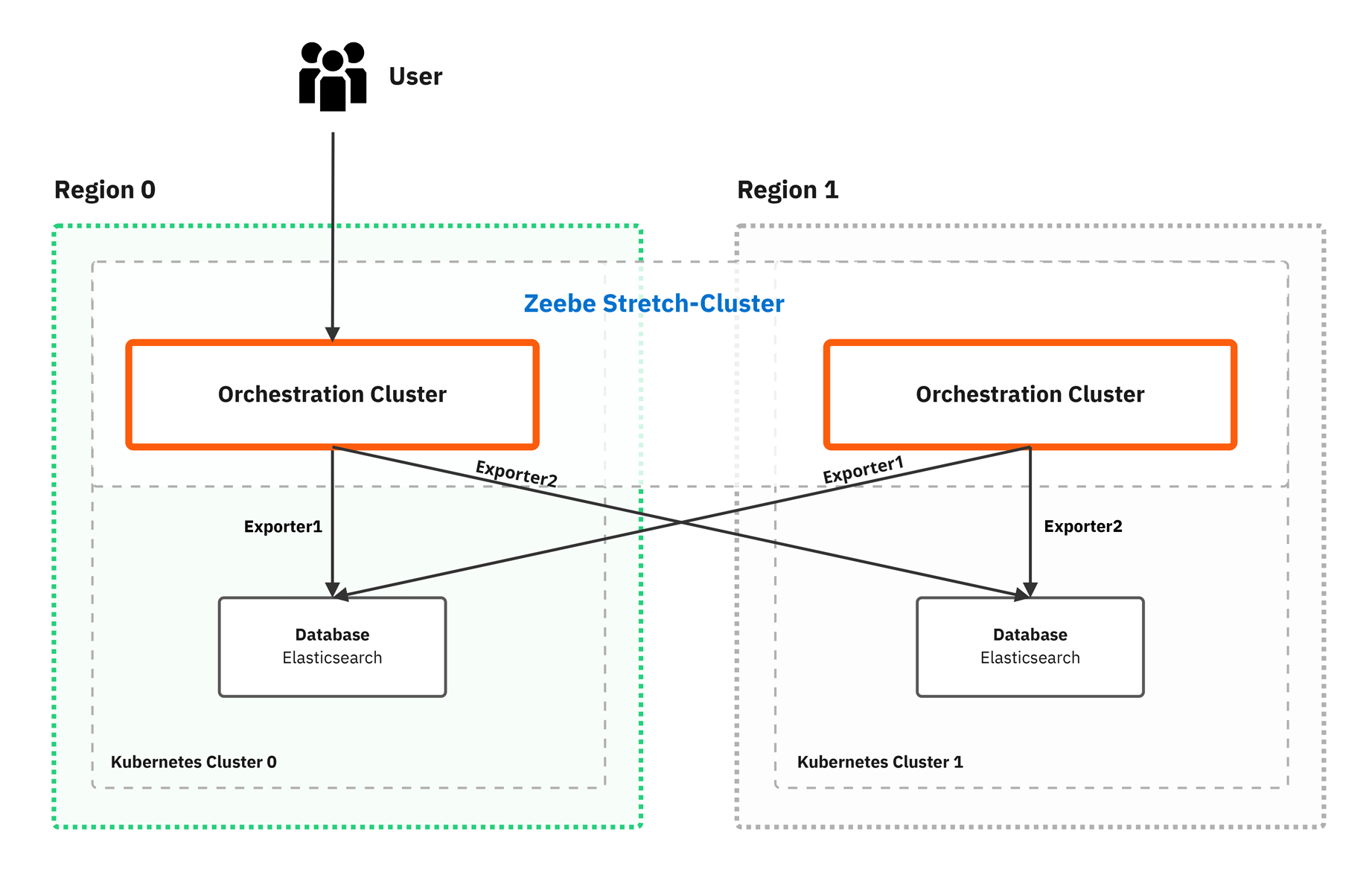
- With v2 APIs (default in 8.9+), both regions serve user traffic simultaneously.
- With v1 APIs, Region 0 is the primary region serving user traffic; Region 1 is operational but doesn't serve user traffic under normal conditions.
The diagram shows both regions as operational. Any grayed-out appearance represents user traffic routing, not system operational status. All components in both regions must be running.
| Component | Mode | Both regions running | User traffic | RPO |
|---|---|---|---|---|
Orchestration Cluster | ✅ Required | |||
| Zeebe | Active-active | ✅ Required | Both regions process data | 0 |
| Admin | Active-active | ✅ Required | Cluster-level identity | 0 |
| Operate | Active-active with v2 API (active-passive with v1) | ✅ Required | Both regions serve users with v2 API | 0 |
| Tasklist | Active-active with Tasklist V2 (active-passive with v1) | ✅ Required | Both regions serve users with Tasklist V2 | 0 |
Elasticsearch | Active-active | ✅ Required | Data replicated to both | 0 |
In a dual-region setup, each Orchestration Cluster component operates as follows:
- Orchestration cluster runs across both regions using the Raft protocol, distributing partition leaders and followers for continuous replication.
- Camunda exporters push identical data to the Elasticsearch instance in each region. Camunda orchestration cluster dual export mechanism (not Elasticsearch replication) maintains data consistency. The two Elasticsearch clusters don't communicate directly with each other.
- Operate and Tasklist maintain synchronized data state across both regions via the Camunda Exporter. See Active-active and active-passive modes.
- Admin is embedded in the Orchestration Cluster and provides cluster-level identity management.
Component requirements
| Component | Mode | Requirement | Function | Data loss risk |
|---|---|---|---|---|
Orchestration Cluster | ||||
| Zeebe | Active-active | All brokers in both regions must run |
| Can handle region failure without data loss when properly configured |
| Admin | Active-active | Embedded in the Orchestration Cluster |
| Can handle region failure without data loss |
| Operate | Active-active with v2 API (active-passive with v1) | Embedded in the Orchestration Cluster |
| Data loss possible only when using v1 API, as changes are isolated to the initiated region |
| Tasklist | Active-active with Tasklist V2 (active-passive with v1) | Embedded in the Orchestration Cluster |
| Data loss possible only when using v1 API, as changes are isolated to the initiated region |
Elasticsearch | Active-active | Both clusters must run |
| Zeebe exporters may fail globally if the secondary Elasticsearch cluster is down |
Management platform and Orchestration Cluster
A dual-region deployment stretches the Orchestration Cluster across both regions and runs the management platform in a single region. The management platform groups the design and management components that sit outside the Orchestration Cluster. Whether a component belongs to the Orchestration Cluster or to the management platform determines what happens to it when a region is lost, and how you protect it.
| Layer | Components | Stretched across regions | On region loss | Protection |
|---|---|---|---|---|
| Runtime | Orchestration Cluster (Zeebe, Operate, Tasklist, Admin) and its secondary storage | Yes | Processing stops until failover completes, then resumes | Dual-region failover procedure |
| Management platform | Management Identity, Web Modeler, Console, and Optimize | No | Unavailable until you restore it | Backup and restore |
Deploy the management platform in a single region
Deploy the management platform as a separate release in one region, next to the two Orchestration Clusters rather than inside them. That region can be one of the two dual-region regions or a third region. Camunda doesn't stretch these components across regions, and they take no part in the dual-region failover procedure.
The dual-region reference architecture doesn't deploy the management platform. It uses Basic authentication, disables Management Identity, and sets optimize.enabled: false. That's the scope of the reference configuration, not a product restriction: you can run Optimize and Web Modeler alongside a dual-region Orchestration Cluster.
Both components authenticate through Management Identity, so a management platform requires OpenID Connect (OIDC) authentication rather than the Basic authentication the reference configuration uses. Point each component at your Management Identity instance with global.identity.service.url, and give Web Modeler its own PostgreSQL database.
Optimize imports the zeebe-record indices that the legacy Elasticsearch exporter writes. The dual-region reference configuration doesn't write them: it sets orchestration.exporters.zeebe.enabled: false, and the Helm chart doesn't enable this exporter automatically when the Orchestration Cluster spans two regions. Each broker exports only the partitions it leads, so configure the Elasticsearch exporter on every broker in both regions, with the URL of the Elasticsearch cluster that Optimize reads. Add it as an additional exporter through environment variables, the same way the reference configuration adds its regional Camunda Exporters.
The Helm chart doesn't reject optimize.enabled: true in a release that has no Management Identity. That combination installs successfully and then fails to authenticate at runtime. Confirm Management Identity is reachable before you enable Optimize.
Region loss behavior for management platform components
Management platform components don't replicate across regions, so losing the region they run in makes them unavailable until you restore them. If the management platform runs in one of the two dual-region regions, losing that region also stops the Orchestration Cluster until the dual-region failover procedure completes. Failover restores process execution, and deployed processes keep running. It doesn't restore the management platform, which you recover from backups.
Broker processing and authenticated client access recover separately. If the Orchestration Cluster uses OIDC authentication with a provider, such as Keycloak, that runs in the lost region, failover restores broker processing only. Workers, Connectors, and other clients can't get new tokens after their current tokens expire, and users can't sign in to the Orchestration Cluster. Process instances that wait for job workers then stop progressing. Run the OIDC provider where it survives the loss of either dual-region region, or recover it as part of the failover.
| Component | State it holds | If its region is lost |
|---|---|---|
| Management Identity | Users, groups, roles, tenants, and OIDC clients | Authentication to Optimize, Web Modeler, and Console fails until you restore it |
| OIDC provider, such as Keycloak | Users, credentials, and client registrations | Clients of the Orchestration Cluster can't get new tokens, and users can't sign in, until you restore it |
| Web Modeler | Diagrams, projects, and collaboration history in PostgreSQL | Modeling and deployment from Web Modeler stop until you restore it |
| Console | No persistent state of its own | The Console UI is unavailable until you redeploy it |
| Optimize | Reports, dashboards, collections, alerts, and its own import position | Reporting stops until you restore it, and content created since the last backup is lost |
Protect the management platform with backup and restore
Back up Management Identity and Web Modeler on their own schedule. If Optimize shares the Elasticsearch instance of the Orchestration Cluster, back it up together with the Orchestration Cluster, using the same backup ID. Replicate all backups to a second region, so they survive the loss of the management platform region.
| Component | Backup method |
|---|---|
| Management Identity | Back up its PostgreSQL database using your database's native tooling. Also back up your OIDC provider, such as Keycloak, and keep user IDs unchanged when you restore it |
| Web Modeler | Back up its PostgreSQL database. See Web Modeler backup and restore |
| Console | No backup required. Console is stateless, so redeploy it alongside the rest of the management platform |
| Optimize | Use the Optimize backup API with the same backup ID as the Orchestration Cluster backup. See Optimize backup and restore |
The management platform's recovery point and recovery time follow from your backup interval and restore procedure. The dual-region recovery objectives don't cover them, because those objectives apply to the Orchestration Cluster only.
Active-active and active-passive modes
Starting in Camunda 8.9, active-active is the default user traffic routing for dual-region deployments:
- Active-active: Both regions serve user traffic simultaneously. All writes flow through the Camunda Exporter, which maintains data consistency regardless of which region handles the request. This is the default with v2 REST API and Tasklist V2 (8.9+).
- Active-passive: One region handles all user traffic; the other is operational but doesn't serve user requests. Required for deployments using v1 APIs, because v1 stores some state locally per region (batch operations, task assignments).
In both modes, both regions participate in data processing and replication at all times. "Passive" refers only to the user traffic layer.
Starting in Camunda 8.8, the v2 REST API removed previous region-specific limitations. In current releases, Tasklist also uses only the Orchestration Cluster REST API, so user task operations are no longer tied to the legacy Tasklist V1 behavior. These improvements make a user-facing active-active setup possible. Starting with version 8.9, active-active routing is the default for dual-region deployments.
Traffic routing
Primary and secondary regions
In v2 API deployments (default in 8.9+), both regions serve user traffic simultaneously and there's no primary/secondary distinction at the UI layer. See Active-active and active-passive modes.
In v1 API deployments, one region is designated as primary and the other as secondary:
- Primary region: Serves user traffic (UI access, API calls).
- Secondary region: Operational but doesn't serve user traffic under normal conditions.
In both cases, both regions are operationally active with all components running and replicating data.
Managing user traffic
With v2 APIs (default in 8.9+), distribute traffic across both regions using DNS, a load balancer, or network routing policies.
With v1 APIs, route all user traffic exclusively to the primary region. You're responsible for configuring and maintaining:
- DNS routing to the primary region
- Load balancer rules and health checks
- Traffic redirection to the secondary region during primary region failure, as part of the complete failover procedure
Redirecting traffic without following the full operational procedure can cause system inconsistencies and data issues.
Requirements
Running dual-region setups requires you to develop, test, and execute custom operational procedures specific to your environment.
Installation requirements
To install with the Helm chart, you need two Kubernetes clusters.
Dual-region configurations don't support OpenSearch or RDBMS (relational database) secondary storage.
Network requirements
- Kubernetes clusters, services, and pods must use distinct, non-overlapping CIDRs to avoid routing issues.
- Both regions must be able to communicate with each other (for example, via VPC peering). See the example AWS EKS implementation.
- Kubernetes services in one cluster must be resolvable and reachable from the other cluster and vice-versa:
- For AWS EKS, configure DNS chaining. See the Amazon EKS setup guide.
- For OpenShift, use Submariner for multi-cluster networking. See the OpenShift dual-region setup guide.
- Kubernetes services in one cluster must be resolvable and reachable from the other cluster and vice-versa:
- Network round-trip time (RTT) between regions directly affects Raft commit latency and throughput. As a guideline, keep RTT at or below 100 ms. Higher latencies degrade performance, but are not a hard limit enforced by the engine.
- Required open ports between regions:
- 9200: Elasticsearch (cross-region data pushed by Zeebe)
- 26500: Zeebe Gateway (client/worker communication)
- 26501 and 26502: Zeebe broker and Zeebe Gateway communication
Zeebe cluster configuration
Zeebe supports the following broker and replication configurations for dual-region setups:
clusterSizemust be a multiple of 2 and at least 4 to distribute brokers evenly across both regions.replicationFactormust be 4 to ensure even partition distribution across regions.partitionCountis unrestricted but should be based on workload requirements. See understanding sizing and scalability behavior and partitions.
Zeebe creates partitions in a round-robin fashion. The Helm chart places all brokers with even numbers (0, 2, 4, 6, ...) in one region and all brokers with odd numbers (1, 3, 5, 7, ...) in the other. This distribution ensures even partition replication across both regions.
Scaling the Zeebe cluster
When scaling, follow the cluster scaling steps and ensure you meet the Zeebe cluster configuration requirements.
Keep both regions balanced. They should always have the same number of brokers.
Infrastructure and deployment platform considerations
Multi-region setups require careful planning. You must manage the following areas independently. Camunda doesn't control or document them:
- Kubernetes cluster management: Managing multiple Kubernetes clusters and deployments across regions
- Monitoring and alerting: Dual-region monitoring with cross-region correlation
- Cost implications: Multiple clusters and cross-region traffic increase costs
- Network reliability: Increased latency can affect data consistency and synchronization. Even short latency bursts can have an impact.
- Traffic management: DNS and incoming traffic routing
- Security: Consistent security policies and network controls across regions
Before implementing dual-region, ensure your organization has:
- Experience managing multi-cluster Kubernetes environments
- Established procedures for cross-region networking and security
- Monitoring and alerting systems with cross-region correlation capability
- Defined RTO/RPO requirements and tested recovery procedures
Upgrade considerations
Follow the upgrade recommendations in the Camunda Helm chart and the component-specific upgrade guides.
Review the upgrade overview before starting, and always create a Camunda-supported backup first.
For dual-region setups, use a staged upgrade approach: upgrade one region at a time. Upgrading both regions simultaneously risks quorum loss in Zeebe partitions. Complete the upgrade in one region before starting the other, updating only one Zeebe broker at a time.
Certain minor version upgrades might require you to upgrade both regions simultaneously to complete migration steps. Always check the release notes and migration instructions for your version before proceeding.
Limitations
| Aspect | Details |
|---|---|
| Installation methods | Only Kubernetes with the Camunda Helm chart is supported. Alternative installation methods such as docker-compose aren't covered by our guides. |
| v1 API user traffic | Deployments using v1 APIs don't support active-active user traffic routing. All user traffic must be routed to a single primary region. See Active-active and active-passive modes. |
| Management Identity | Not deployed by the dual-region reference configuration, which uses Basic authentication. The Orchestration Cluster-level Admin provides multi-tenancy and role-based access control (RBAC) instead. Deploy Management Identity in a single region if you need Optimize or Web Modeler. See Management platform and Orchestration Cluster. |
| Optimize | Runs in a single region alongside a dual-region cluster, with no multi-region guarantees. Requires OIDC authentication and Management Identity. If its region is lost, Optimize is unavailable until you restore it. See Management platform and Orchestration Cluster. |
| Connectors deployment | Connectors can be deployed in a dual-region setup, but you must account for idempotency to avoid event duplication. With two connector deployments running, message idempotency is critical. |
| Connectors | If you run Connectors with an inbound connector deployed in a dual-region setup:
|
| Zeebe cluster scaling | Supported. See Zeebe cluster configuration. |
| Web Modeler | Runs in a single region alongside a dual-region cluster, with no multi-region guarantees. Requires OIDC authentication, Management Identity, and PostgreSQL. If its region is lost, Web Modeler is unavailable until you restore it. See Management platform and Orchestration Cluster. |
Region failure and recovery
In a dual-region setup, losing either region affects Camunda 8 processing because of Zeebe's quorum requirements.
When a region becomes unavailable, the Zeebe cluster loses quorum (half of its brokers become unreachable) and immediately stops processing new data. All components stop processing until the failover procedure completes.
This section covers the Orchestration Cluster. Failover doesn't recover Management Identity, Web Modeler, Console, or Optimize. For their behavior on region loss, see Management platform and Orchestration Cluster.
Region failure causes immediate service interruption:
- No new process instances can start.
- Running process instances are suspended.
- User interfaces become unavailable if the primary region is lost.
See the operational procedure for recovery and re-establishment steps.
Monitor for region failures and execute the operational procedures promptly to ensure smooth recovery.
Primary region failure
If the primary region fails:
- Service disruption: User traffic is unavailable.
- Zeebe halt: Processing stops due to quorum loss.
- Data loss: With v1 APIs, region-specific data (batch operations, task assignments) is lost. With v2 REST API and Tasklist V2, the Camunda Exporter replicates all data to both regions, so data remains available after region failure.
Recovery steps for primary region failure
- Temporary recovery: Follow the operational procedure to restore functionality and unblock the process automation engine (Zeebe).
- Traffic rerouting: With v2 APIs (default in 8.9+), remove the failed region from serving traffic (for example, via DNS or load balancer health checks). With v1 APIs, redirect user traffic to the secondary region (now primary).
- Data and task management (v1 API setups only):
- Reassign uncompleted tasks lost from the previous primary region.
- Recreate batch operations in Operate.
- Permanent region setup: Follow the operational procedure to create a new secondary region.
Secondary region failure
If the secondary region fails:
- Zeebe halt: Processing stops due to quorum loss.
- UI availability: Operate and Tasklist remain accessible from the primary region.
- Process execution: No new process instances can start. Zeebe suspends running instances until quorum is restored.
Recovery steps for secondary region failure
- Temporary recovery: Follow the operational procedure to restore processing.
- Permanent region setup: Follow the operational procedure to create a new secondary region.
Unlike primary region failure, no user-facing data is lost and no traffic rerouting is necessary.
Recovery objectives (RPO and RTO)
Based on the requirements and limitations outlined in this page, you can use the Recovery Point Objective (RPO) and Recovery Time Objective (RTO) values below to inform your risk assessment.
The RPO is the maximum tolerable data loss measured in time.
The Recovery Time Objective (RTO) is the time required to restore services to a functional state.
For Operate, Tasklist, and Zeebe, the RPO is 0.
The RTO applies to both the failover and failback procedures:
- Failover RTO: < 1 minute to restore a functional state, excluding DNS reconfiguration and network considerations.
- Failback RTO: Five minutes plus the time required to back up and restore Elasticsearch. This depends on your setup and chosen Elasticsearch backup type.
In internal tests, reinstalling and reconfiguring Camunda 8 takes approximately five minutes. Treat this as a general guideline. Actual times vary depending on available resources and your familiarity with the procedure.
Related resources
- Multi-region resilience overview
- Cold Recovery
- Amazon EKS dual-region setup guide: an example blueprint using managed EKS and VPC peering with Terraform. The concepts are mainly cloud-agnostic and can be adopted by other cloud providers.
- OpenShift dual-region setup guide
- Dual-region operational procedure: covers how to respond to a total region loss and how to prepare your environment for smooth recovery.
- Camunda backup and restore overview