Azure blob storage connector
Upload documents to and download documents from Azure Blob Storage in your BPMN process.
About this connector
The Azure Blob Storage connector is an outbound connector that lets your BPMN process interact with Azure Blob Storage resources. It currently supports uploading and downloading documents.
Prerequisites
To use the Azure Blob Storage connector, create the following resources:
- An Azure storage account.
- An Azure container.
- An Azure shared access signature (SAS) for the container. You need both the SAS token and the SAS URL.
Create a connector secret
Keep your SAS token and SAS URL secure by not including them directly in the BPMN XML file. Instead, create a secret:
- Follow the guide for creating secrets.
- Name your secrets (for example,
AZURE_SAS_TOKEN) so you can reference them later in the connector configuration, for example as{{secrets.AZURE_SAS_TOKEN}}.
Create a connector task
You can apply a connector to a task or event via the append menu. For example:
- From the canvas: Select an element and click the Change element icon to change an existing element, or use the append feature to add a new element to the diagram.
- From the properties panel: Navigate to the Template section and click Select.
- From the side palette: Click the Create element icon.
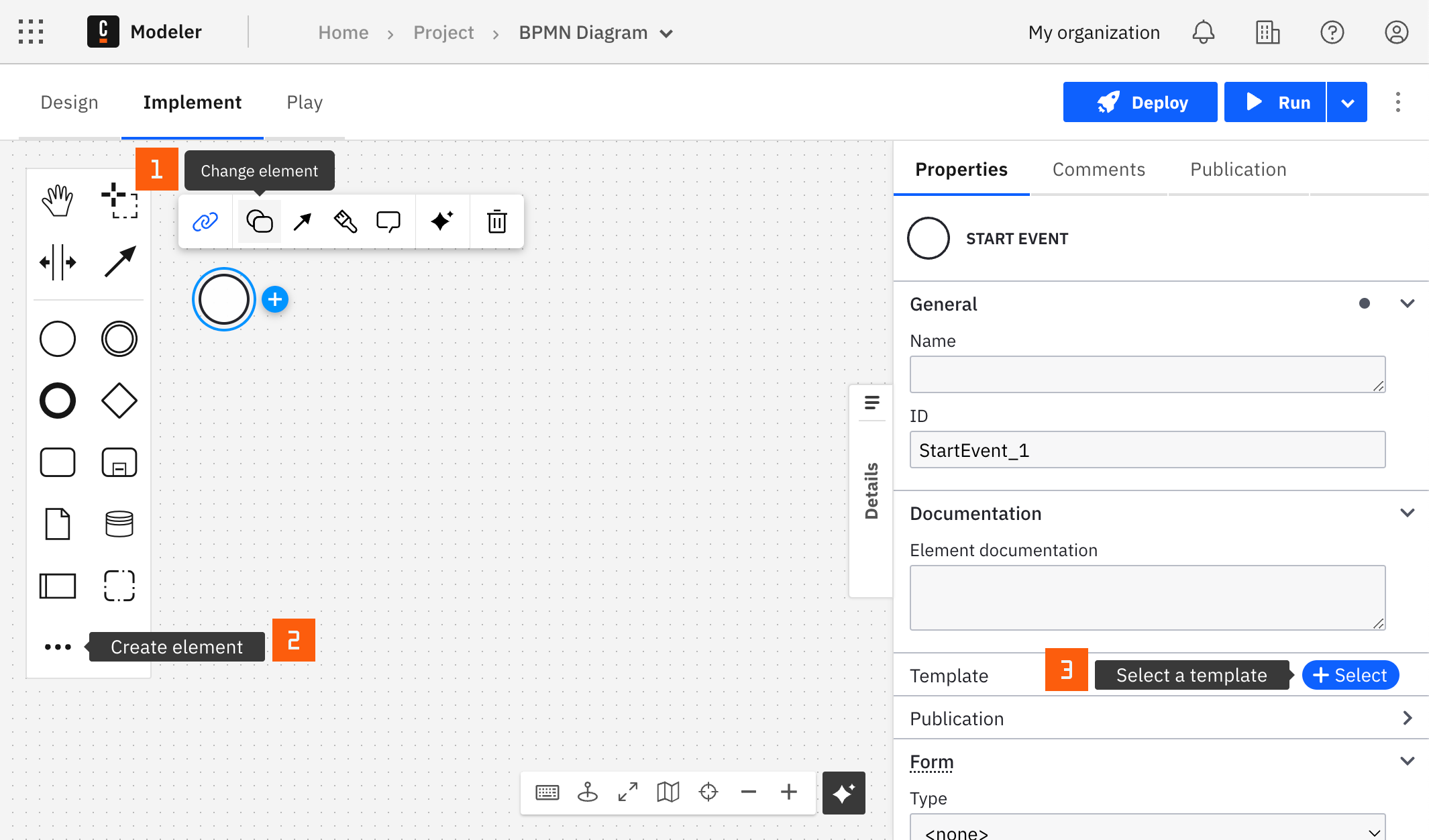
After you have applied a connector to your element, follow the configuration steps or see using connectors to learn more.
Configuration
Authentication
The connector authenticates with a shared access signature (SAS).
| Property | Type | Required | Description | Example |
|---|---|---|---|---|
| SAS token | String | Yes | The SAS token of the container. See prerequisites. | |
| SAS URL | String | Yes | The SAS URL of the container. See prerequisites. |
Operation
Select the operation from the Operation dropdown. The options are Upload blob (default) and Download blob. The properties that appear depend on your selection.
Operations
Upload document
Upload a document to a container in Azure Blob Storage.
Input parameters
| Property | Type | Required | Description | Example |
|---|---|---|---|---|
| Blob Storage container | String | Yes | The name of the container to upload to. A container acts as a directory that organizes a set of blobs. It must match the container the SAS token was created for. | |
| Document | String | Yes | The document to upload, as a FEEL expression that references a document. | |
| Document file name | String | No | The name of the blob. If left empty, the file name from the document metadata is used. Shown under Additional properties. | |
| Timeout (in seconds) | Number | Yes | The time limit for the upload. Defaults to 30. Shown under Additional properties. | 30 |
If a blob with the same name already exists in the container, it is overwritten. Depending on the settings of the Azure storage account, the previous version may still be accessible in the file version history.
Output
The connector returns the container, the blob name, and the URL of the uploaded blob:
{
  "container": "my-container",
  "filename": "invoice.pdf",
  "link": "https://mystorageaccount.blob.core.windows.net/my-container/invoice.pdf"
}
For example, to get the URL of the uploaded blob, use the Result expression:
= {blobUrl: response.link}
Download document
Download a document from a container in Azure Blob Storage.
Input parameters
| Property | Type | Required | Description | Example |
|---|---|---|---|---|
| Blob Storage container | String | Yes | The name of the container to download from. A container acts as a directory that organizes a set of blobs. It must match the container the SAS token was created for. | |
| File name | String | Yes | The name of the document to download. | |
| Return document as reference | Boolean | Yes | Selected by default. If selected, the connector returns a reference to the document. If cleared, the connector extracts the full content of the document and includes it in the response as a string. |
Output
If Return document as reference is selected, the connector returns a reference to the downloaded document:
{
  "document": {
    "camunda.document.type": "camunda",
    "storeId": "in-memory",
    "documentId": "8b54b413-b847-4650-b445-de963d5c506d",
    "contentHash": "ed0f7ad835669698a108a32b2a99e89e4f5aea84127fde68df4248b11197b0e5",
    "metadata": {
      "contentType": "application/pdf",
      "size": 2048,
      "fileName": "invoice.pdf"
    }
  }
}
If Return document as reference is cleared, the connector returns the content of the document as a string:
{
  "content": "The content of the document"
}
To work with the document reference in later steps, for example to pass it to another connector, use the Result expression:
= {invoice: response.document}
To learn how to use documents in your process, see upload a document when using any connector.
Troubleshooting
If the connector task fails, check the following:
- The SAS token, SAS URL, and Blob Storage container belong together, and the SAS has not expired.
- For downloads, the File name matches the name of an existing blob in the container.
To handle connector errors in your process, see BPMN errors and failing jobs. To change the number of retries, see use an outbound connector.