AWS Lambda connector
Invoke an AWS Lambda function from your BPMN process and use its response in later steps.
About this connector
The AWS Lambda connector is an outbound connector that connects your BPMN service with the AWS Lambda service. Use it to run serverless code, such as a calculation or a call into another AWS service, as part of a process, and to pass JSON data to the function and receive its result.
The connector supports synchronous invocation only. It waits for the function to finish and returns its response. Asynchronous (event-driven) invocation isn't available.
Prerequisites
To use the AWS Lambda connector, you need the following:
| Prerequisite | Description |
|---|---|
| AWS Lambda function | A deployed function you want to invoke. |
| AWS IAM user and permissions | An IAM access key and secret key pair with permission to run the function. Not required if you use the default credentials chain (hybrid/Self-Managed only). |
Use secrets to avoid exposing your AWS IAM credentials as plain text. Refer to managing secrets to learn more.
Create an AWS Lambda connector task
You can apply a connector to a task or event via the append menu. For example:
- From the canvas: Select an element and click the Change element icon to change an existing element, or use the append feature to add a new element to the diagram.
- From the properties panel: Navigate to the Template section and click Select.
- From the side palette: Click the Create element icon.
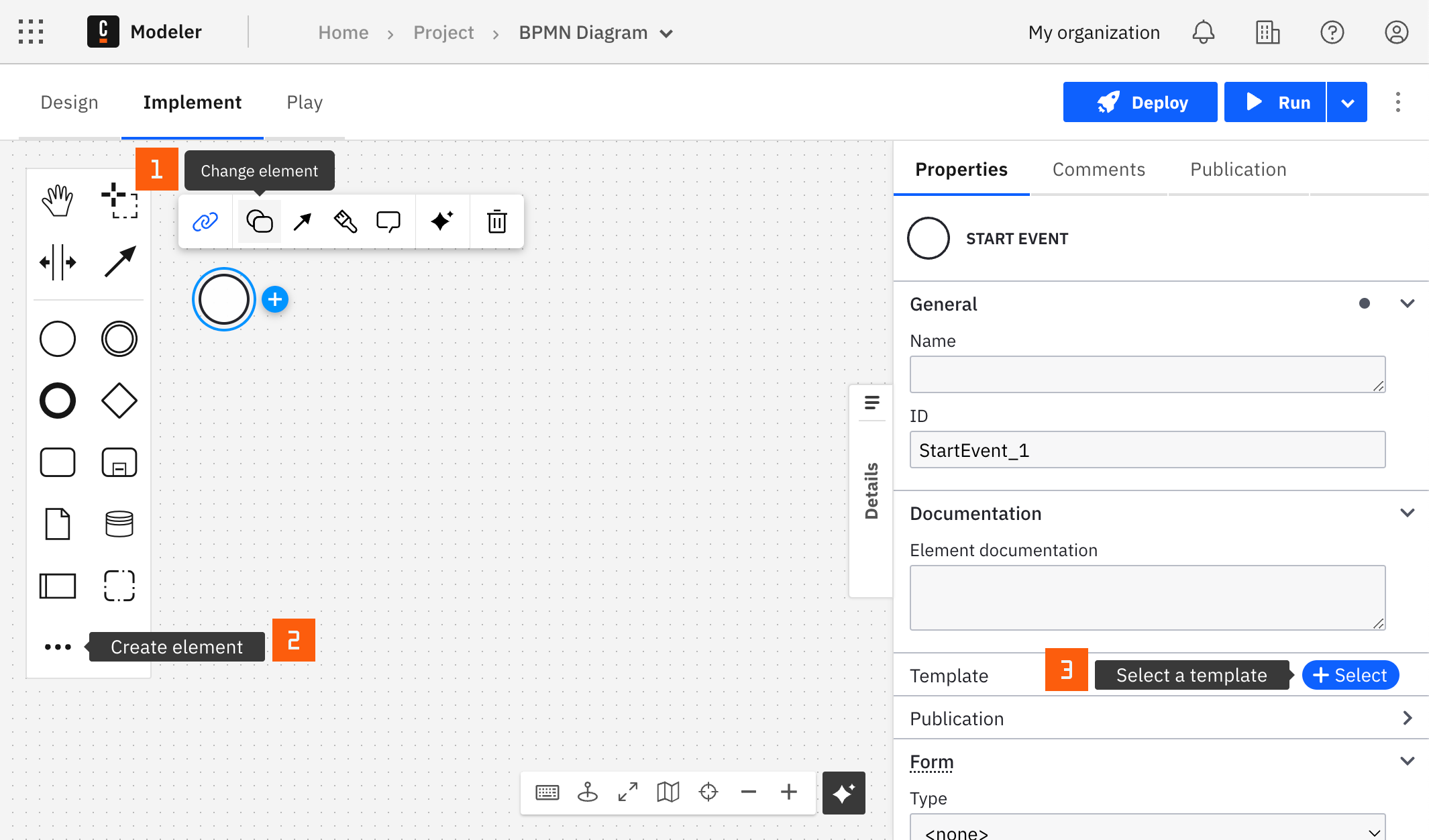
After you have applied a connector to your element, follow the configuration steps or see using connectors to learn more.
Configuration
Authentication
Select an authentication method for the connector. Learn more about the available options in AWS authentication types.
| Property | Type | Required | Description | Example |
|---|---|---|---|---|
| Authentication | Dropdown | Yes | The AWS authentication strategy: Credentials, or Default Credentials Chain (Hybrid/Self-Managed only). | Credentials |
| Access key | String | Yes | IAM access key of a user with the necessary permissions for this connector. Shown when Authentication is Credentials. | {{secrets.MY_AWS_ACCESS_KEY}} |
| Secret key | String | Yes | IAM secret key of a user with the necessary permissions for this connector. Shown when Authentication is Credentials. | {{secrets.MY_AWS_SECRET_KEY}} |
Region
| Property | Type | Required | Description | Example |
|---|---|---|---|---|
| Region | String | Yes | The AWS region where your function is hosted. Refer to Regions and Zones to learn more. | us-east-1 |
AWS authentication types
You can authenticate the connector with AWS in the following ways:
- Credentials: Use this option if your AWS account administrator provided a pair of access and secret keys. It applies to SaaS and Self-Managed.
- Default Credentials Chain (Hybrid/Self-Managed only): Use this option if your system relies on an implicit authentication mechanism, such as role-based authentication, credentials supplied through environment variables, or files on the target host. It applies only to Self-Managed or hybrid distributions, and uses the Default Credential Provider Chain to resolve credentials.
Operations
Invoke function
Invoke an AWS Lambda function synchronously and return its response.
Input parameters
| Property | Type | Required | Description | Example |
|---|---|---|---|---|
| Operation type | Dropdown | Yes | The invocation type. Invoke function (sync) is the only option. | Invoke function (sync) |
| Function name | String | Yes | The name, ARN, or alias of your function. | my-function |
| Payload | Text | Yes | The JSON input passed to your Lambda function when it is invoked. Use a FEEL expression to build it from process variables. | = { "orderId": orderId } |
Output
The connector returns the HTTP status code, executed version, and payload (the response from the function, or an error object). The following fields are available in the response variable:
statusCode- HTTP status code returned by the AWS Lambda Invoke API. This shows whether AWS Lambda accepted and handled the invocation request. It does not indicate whether the Lambda function itself returned a successful result.executedVersion- Executed version of the Lambda function.payload- The response returned by the Lambda function, or an error object. If your function returns its ownstatusCodein the payload, that value describes the function result and is separate from the top-level connectorstatusCode.
If your Lambda function includes a statusCode in its response body, access it with response.payload.statusCode rather than response.statusCode.
You can use an output mapping to map the response:
- Use Result variable to store the response in a process variable. For example,
myResultVariable. - Use Result expression to map fields from the response into process variables. For example:
= {
  "myNewReportStatusCode": response.statusCode,
  "myNewReportExecutedVersion": response.executedVersion,
  "myNewReportPayload": response.payload
}