Amazon Comprehend connector
Integrate your BPMN service with Amazon Comprehend to classify documents with a custom classification model.
About this connector
The Amazon Comprehend connector is an outbound connector that connects your BPMN service with Amazon Comprehend, a service that extracts insights about the content of documents, such as personal identifiable information and key phrases. Use it to classify a document as part of a process, for example to route an incoming document based on its class.
The connector supports two execution types:
- Sync: Classifies a single piece of text in real time and returns the result to your process.
- Async: Starts an asynchronous document classification job, for example for larger files or several documents at once, and returns the job details. The job results are written to an Amazon S3 location.
Prerequisites
To use the Amazon Comprehend connector, you need the following:
| Prerequisite | Description |
|---|---|
| AWS IAM user and permissions | An IAM access key and secret key pair with the appropriate Amazon Comprehend permissions. Not required if you use the default credentials chain (hybrid/Self-Managed only) |
Use secrets to avoid exposing your AWS IAM credentials as plain text. Refer to managing secrets to learn more.
Create an Amazon Comprehend connector task
You can apply a connector to a task or event via the append menu. For example:
- From the canvas: Select an element and click the Change element icon to change an existing element, or use the append feature to add a new element to the diagram.
- From the properties panel: Navigate to the Template section and click Select.
- From the side palette: Click the Create element icon.
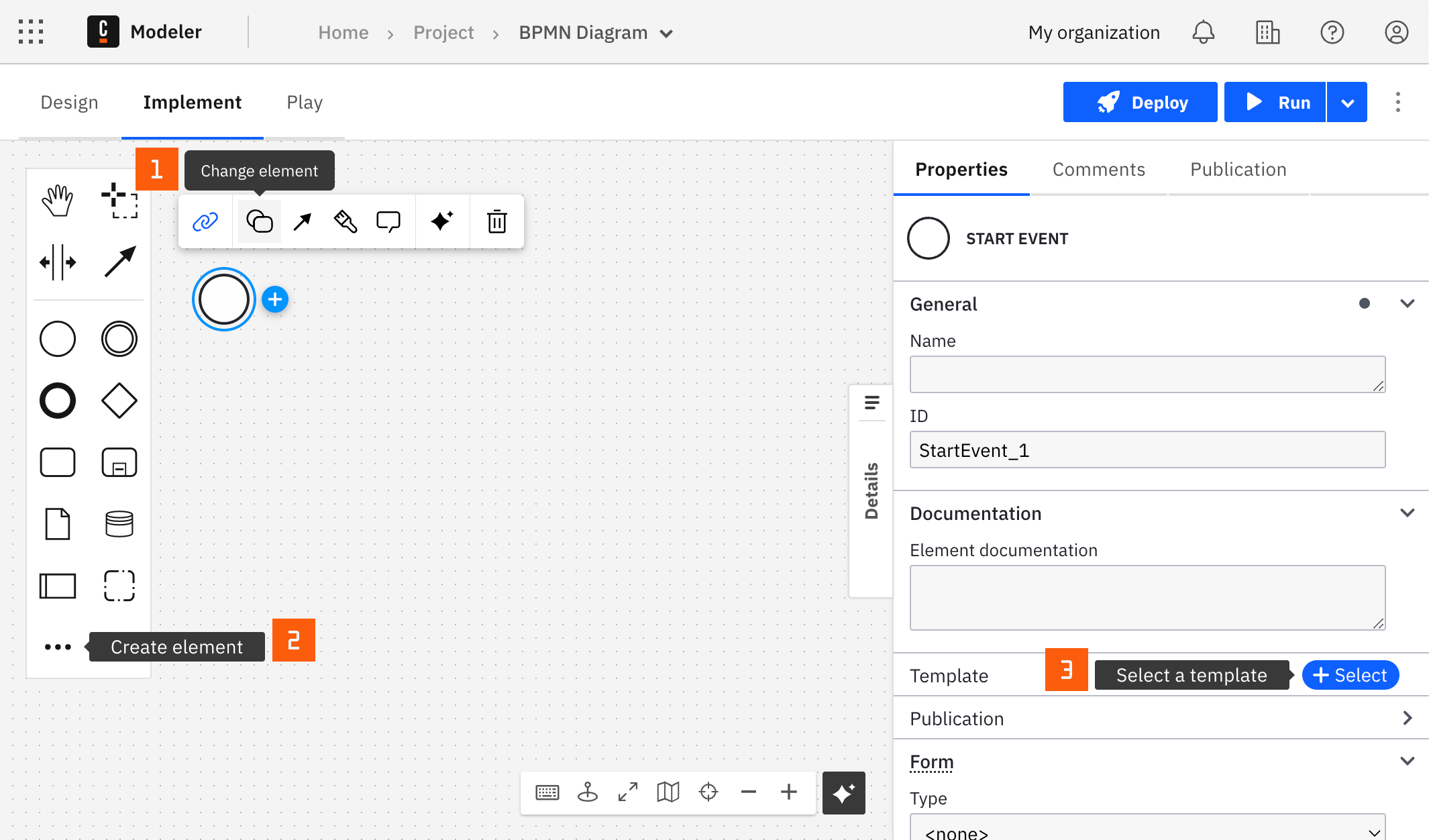
After you have applied a connector to your element, follow the configuration steps or see using connectors to learn more.
Configuration
Authentication
Select an authentication method for the connector. Learn more about the available options in AWS authentication types.
| Property | Type | Required | Description | Example |
|---|---|---|---|---|
| Authentication | Dropdown | Yes | The AWS authentication strategy: Credentials, or Default Credentials Chain (Hybrid/Self-Managed only). | Credentials |
| Access key | String | Yes | IAM access key of a user with the necessary permissions for this connector. Shown when Authentication is Credentials. | {{secrets.MY_AWS_ACCESS_KEY}} |
| Secret key | String | Yes | IAM secret key of a user with the necessary permissions for this connector. Shown when Authentication is Credentials. | {{secrets.MY_AWS_SECRET_KEY}} |
Region
| Property | Type | Required | Description | Example |
|---|---|---|---|---|
| Region | String | Yes | The AWS region where your Amazon Comprehend service and S3 buckets are hosted. Choosing the matching region reduces latency and helps you meet compliance requirements. Refer to AWS regional data for a list of regions. | us-east-1 |
AWS authentication types
You can authenticate the connector with AWS in the following ways:
- Credentials: Use this option if your AWS account administrator provided a pair of access and secret keys. It applies to SaaS and Self-Managed.
- Default Credentials Chain (Hybrid/Self-Managed only): Use this option if your system relies on an implicit authentication mechanism, such as role-based authentication, credentials supplied through environment variables, or files on the target host. It applies only to Self-Managed or hybrid distributions, and uses the Default Credential Provider Chain to resolve credentials.
Operations
Select the operation with the Execution type dropdown. The available input parameters depend on your selection.
| Property | Type | Required | Description | Example |
|---|---|---|---|---|
| Execution type | Dropdown | Yes | Sync classifies a single piece of text in real time. Async starts a document classification job. | Sync |
Classify a document (Sync)
Create a classification request and analyze a single document in real time. For more details, refer to the ClassifyDocument API.
Input parameters
| Property | Type | Required | Description | Example |
|---|---|---|---|---|
| Text | String | Yes | The text to be analyzed. | |
| Endpoint's ARN | String | Yes | The Amazon Resource Name (ARN) of the custom model endpoint used to run the classification. | arn:aws:comprehend:us-east-1:123456789012:document-classifier-endpoint/my-endpoint |
Output
The connector response mirrors the ClassifyDocument response of the AWS Comprehend service. It contains the following fields:
| Field | Description |
|---|---|
sdkResponseMetadata | Metadata of the AWS response, such as the requestId. |
sdkHttpMetadata | The HTTP status code and headers of the AWS response. |
classes | The classes of the document, each with a name, a score, and the page it applies to. |
labels | The labels of the document, each with a name, a score, and the page it applies to. |
documentMetadata | The number of pages and the extracted characters per page. |
documentType | The document type per page. |
errors | Page-level errors reported by Amazon Comprehend. |
warnings | Page-level warnings reported by Amazon Comprehend. |
Fields that Amazon Comprehend does not return are null. For example, a response for a classifier that returns classes:
{
  "sdkResponseMetadata": {
    "requestId": "929bf054-193b-48e6-ab80-3aeeb613b415"
  },
  "sdkHttpMetadata": {
    "httpHeaders": { "Content-Type": "application/x-amz-json-1.1" },
    "httpStatusCode": 200,
    "allHttpHeaders": { "Content-Type": ["application/x-amz-json-1.1"] }
  },
  "classes": [
    { "name": "CHECKING_AC", "score": 0.5423, "page": null },
    { "name": "SAVINGS_AC", "score": 0.4577, "page": null }
  ],
  "labels": null,
  "documentMetadata": null,
  "documentType": null,
  "errors": null,
  "warnings": null
}
To map the response into process variables, use Result variable to store the whole response, or Result expression to map individual fields. For example, to store only the first element of classes:
= {classInfo: response.classes[1]}
Start a classification job (Async)
Start an asynchronous document classification job using a custom classification model. Use this operation to submit documents for analysis and receive the results later, which suits background processing, larger files, or handling several documents at once. For more details, refer to the StartDocumentClassificationJob API.
Input parameters
| Property | Type | Required | Description | Example |
|---|---|---|---|---|
| Document read mode | Dropdown | Yes | Determines the text extraction actions for PDF files: Service default, Force document read action, or None. Defaults to Service default. | Service default |
| Document read action | Dropdown | Yes | The Amazon Textract API operation that Amazon Comprehend uses to extract text from PDF files and image files: Detect document text, Analyze document, or None. For more details, refer to document read action. Defaults to Detect document text. | Detect document text |
| Analyze tables | Boolean | No | Returns additional information about any tables that are detected in the input document. Shown when Document read action is Analyze document. For more details, refer to feature types. | |
| Analyze forms | Boolean | No | Returns additional information about any forms that are detected in the input document. Shown when Document read action is Analyze document. For more details, refer to feature types. | |
| Inputs' S3 URI | String | Yes | The Amazon S3 URI for the input data. | s3://my-input-bucket/documents/ |
| Input file processing mode | Dropdown | Yes | Specifies how the text in an input file is processed: Each file is considered a separate document, Each line in a file is considered a separate document, or None. Defaults to Each file is considered a separate document. | Each file is considered a separate document |
| Client request token | String | No | A unique identifier for the request. If you do not set the client request token, Amazon Comprehend generates one. | |
| Data Access Role's ARN | String | Yes | The ARN of the IAM role that grants Amazon Comprehend read access to your input data. | arn:aws:iam::123456789012:role/comprehend-data-access-role |
| Document Classifier's ARN | String | Yes | The ARN of the document classifier to use to process the job. | arn:aws:comprehend:us-east-1:123456789012:document-classifier/my-classifier |
| Flywheel's ARN | String | No | The ARN of the flywheel that orchestrates training and versioning of the classification model. | |
| Job name | String | No | The identifier of the job. | |
| Output's S3 URI | String | Yes | The Amazon S3 location where you want to write the output data. | s3://my-output-bucket/results/ |
| Outputs KMS Key Id | String | No | The ID of the AWS Key Management Service (KMS) key that Amazon Comprehend uses to encrypt the output results of the job. | |
| Tags | String | No | Tags to associate with the document classification job. A tag is a key-value pair that adds metadata to a resource used by Amazon Comprehend. Provide a FEEL expression. | = {"status": "active"} |
| VolumeKmsKeyId | String | No | The ID of the KMS key that Amazon Comprehend uses to encrypt data on the storage volume attached to the ML compute instances that process the job. | |
| Security group Ids | String | No | The ID of each security group on an instance of your private VPC. Provide a FEEL expression. | = ["sg-07a2cc6d96e4ec178"] |
| Subnets | String | No | The ID of each subnet used in your private VPC. Provide a FEEL expression. | = ["subnet-013eac53274e1d93f"] |
To use a VPC, you need at least one VPC endpoint. For more details, refer to create a VPC endpoint.
Output
The connector response mirrors the StartDocumentClassificationJob response of the AWS Comprehend service. It contains the job details, not the classification results: Amazon Comprehend writes the results to the location you set in Output's S3 URI when the job completes.
| Field | Description |
|---|---|
sdkResponseMetadata | Metadata of the AWS response, such as the requestId. |
sdkHttpMetadata | The HTTP status code and headers of the AWS response. |
jobId | The identifier of the job. |
jobArn | The ARN of the job. |
jobStatus | The status of the job, for example SUBMITTED. |
documentClassifierArn | The ARN of the document classifier that processes the job. |
For example:
{
  "sdkResponseMetadata": {
    "requestId": "929bf054-193b-48e6-ab80-3aeeb613b415"
  },
  "sdkHttpMetadata": {
    "httpHeaders": { "Content-Type": "application/x-amz-json-1.1" },
    "httpStatusCode": 200,
    "allHttpHeaders": { "Content-Type": ["application/x-amz-json-1.1"] }
  },
  "jobId": "12345678-1234-1234-1234-123456789012",
  "jobArn": "arn:aws:comprehend:eu-central-1:123456789012:document-classification-job/12345678-1234-1234-1234-123456789012",
  "jobStatus": "SUBMITTED",
  "documentClassifierArn": "arn:aws:comprehend:eu-central-1:123456789012:document-classifier/my-classifier"
}
Troubleshooting
To learn about general error handling in Camunda, see BPMN errors and failing jobs.