Amazon Bedrock connector
Use the Amazon Bedrock connector to invoke foundation models and run multi-turn conversations with Amazon Bedrock from your BPMN process.
About this connector
The Amazon Bedrock connector is an outbound connector that sends requests to a foundation model in Amazon Bedrock and returns the model's response to your process. It supports two operations:
- Invoke Model sends a raw payload to a model. The payload and the response depend on the model you use.
- Converse starts or continues a conversation with a model. The connector returns the full, updated conversation.
Learn more about Amazon Bedrock in the Amazon Bedrock documentation.
Prerequisites
To use the Amazon Bedrock connector, you need an AWS account with an access key and secret key that can run the InvokeModel or Converse actions. See the AWS documentation for examples of the required permissions.
You must also enable the models you want to use in the region you operate from. See model access in the Amazon Bedrock user guide.
Use secrets to store credentials and avoid exposing sensitive information from the process. See managing secrets.
Create an Amazon Bedrock connector task
You can apply a connector to a task or event via the append menu. For example:
- From the canvas: Select an element and click the Change element icon to change an existing element, or use the append feature to add a new element to the diagram.
- From the properties panel: Navigate to the Template section and click Select.
- From the side palette: Click the Create element icon.
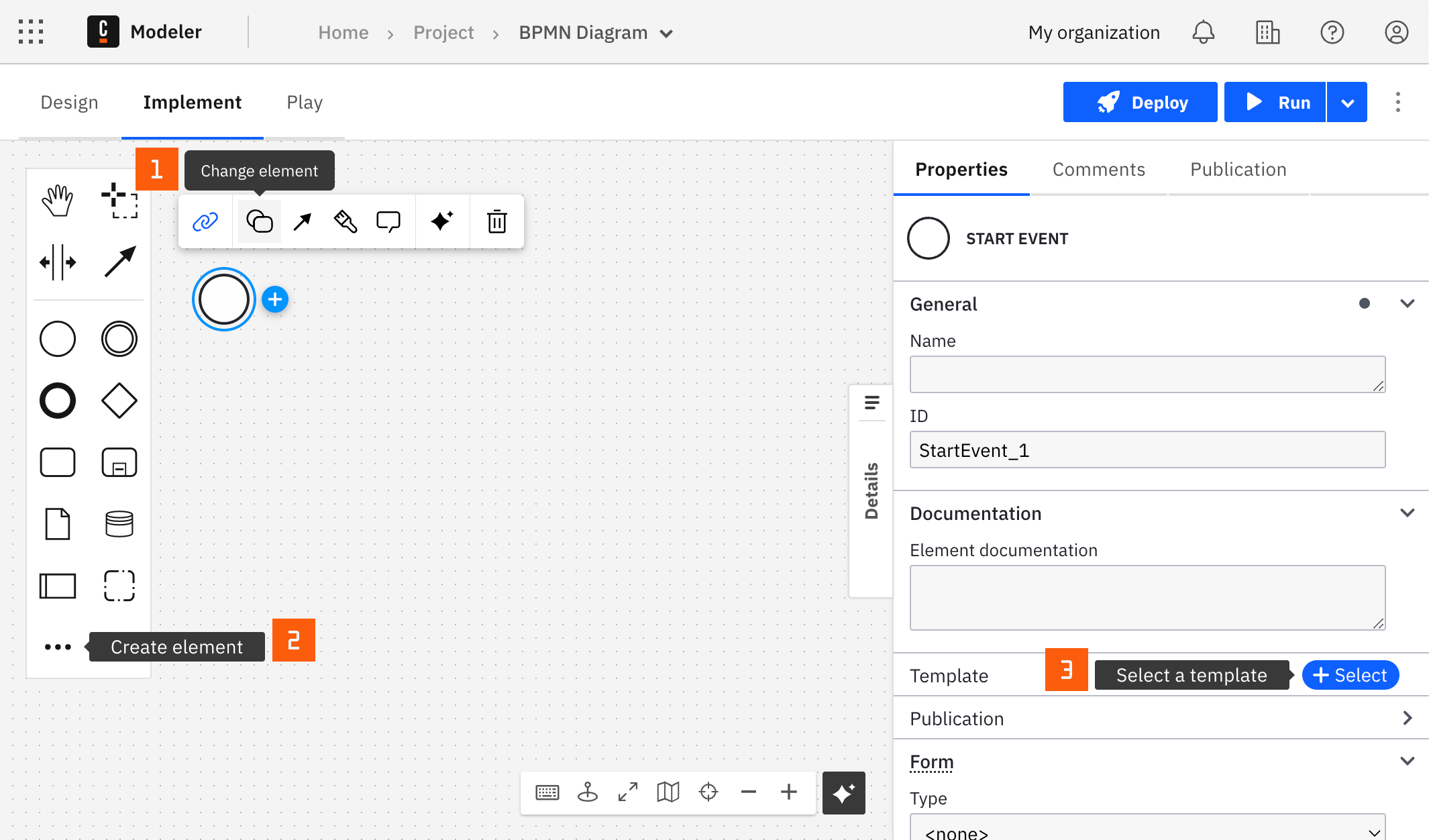
After you have applied a connector to your element, follow the configuration steps or see using connectors to learn more.
Configuration
Authentication
| Property | Type | Required | Description | Example |
|---|---|---|---|---|
| Authentication | Dropdown | Yes | The AWS authentication strategy:
| |
| Access key | String | Yes, if Authentication is Credentials | The IAM access key of a user with permissions to run the Amazon Bedrock actions. | |
| Secret key | String | Yes, if Authentication is Credentials | The IAM secret key of the user with the access key above. |
For more information about authentication and security in Amazon Bedrock, see Amazon Bedrock security and privacy.
Region
| Property | Type | Required | Description | Example |
|---|---|---|---|---|
| Region | String | Yes | The region of the deployed endpoint. | us-east-1 |
Operations
Select the operation in the Action dropdown. Invoke Model is selected by default. The properties that apply depend on the action.
| Property | Type | Required | Description | Example |
|---|---|---|---|---|
| Action | Dropdown | Yes | The operation to run: Invoke Model or Converse. |
Invoke Model
Invoke a model with a raw payload.
Input parameters
| Property | Type | Required | Description | Example |
|---|---|---|---|---|
| Model ID | String | Yes | The ID of the model to invoke. See the model ID documentation for the available options. | ai21.jamba-instruct-v1:0 |
| Payload | String | Yes | The request body sent to the model, as a FEEL expression. Its structure depends on the model. See the model parameters documentation. |
Ensure the model is available in your region, that the model supports the InvokeModel action, and that you are a user with adequate rights.
To learn more about Friendly Enough Expression Language (FEEL) expressions, see what is FEEL?.
Output
The connector wraps the raw AWS response in a body field without changing it, so response.body holds exactly what the model returns. The structure depends on the model. See the model parameters documentation for the response of the model you use.
For Anthropic Claude models, response.body follows the Anthropic Claude Messages API response format:
| Field | Description |
|---|---|
content | Array of content blocks generated by the model |
content[].type | Content block type, typically text |
content[].text | Generated text for a text content block |
For a simple text prompt, the model returns a single content block, so you can extract the assistant's reply into a process variable named AIResponse as follows:
= { AIResponse: response.body.content[1].text }
Other model families, such as Amazon Titan and Nova, Meta Llama, and Cohere, return a different InvokeModel response shape. Check the model parameters documentation for the model you use before writing a Result expression.
Example
If you use the model Jamba-instruct with model ID ai21.jamba-instruct-v1:0, and look at the model parameters Jamba documentation, the payload could be as follows:
{
  "messages": [{ "role": "user", "content": "Hello" }],
  "max_tokens": 256,
  "top_p": 0.8,
  "temperature": 0.7
}
The FEEL mapping in Result expression could be as follows:
= { AIResponse: response.body.choices[1].message.content }
Converse
Start or continue a conversation with a model.
Input parameters
| Property | Type | Required | Description | Example |
|---|---|---|---|---|
| Model ID | String | Yes | The ID of the model to invoke. See the model ID documentation for the available options. | amazon.titan-text-express-v1 |
| New Message | String | Yes | The first message of a conversation, or the next message of a conversation that is already started. | |
| Message History | String | No | The history of the conversation to continue, as a FEEL expression. If not set, this starts a new conversation. Pass the history returned by the previous Converse task to continue a conversation. | |
| Max token returned | Number | No | The maximum number of tokens the model returns. The default is 512. | |
| Temperature | Number | No | The temperature value passed to the model. | |
| top P | Number | No | The top P value passed to the model. | |
| documents | String | No | A FEEL expression that returns a list of documents to include in the new message. |
Ensure the model is available in your region, that the model supports the Converse action, and that you are a user with adequate rights.
To work with Camunda documents, upload them first, using the Orchestration Cluster REST API for example. Then assign the result to a variable in Start process instance so you can reference it in the documents field. See Amazon Bedrock supported document formats for the supported file formats, and document handling for additional details and limitations.
Starting from version 8.7.0, the Amazon Bedrock connector supports consuming documents as inputs for conversations.
The Converse action doesn't currently expose a system prompt field in the connector's element template. To add a system prompt, use the Invoke Model action and add it to the Payload as the model's native API expects. For Anthropic Claude models, add a top-level system field, as described in system prompts for Anthropic Claude models.
Output
The connector doesn't return the raw AWS Converse API response. Instead, it returns the full, updated conversation as an array of messages, adding the assistant's reply to any message history you passed in. Each message has a role (user or assistant) and a contentList array, and each item in contentList has a text field for text content. A user message that included documents also contains document items.
The current implementation supports the assistant's responses only in text format.
The assistant's reply is always the last message in the returned array. Use FEEL's negative indexing to reference it regardless of how many prior messages the conversation contains:
= { AIResponse: response[-1].contentList[1].text }
Pass the returned history as the Message History of the next Converse task, together with the new message.
AWS recommends the Converse API over InvokeModel when you want a process to work with more than one model family, because it uses one request and response shape across all Bedrock model families.
Troubleshooting
To learn about general error handling in Camunda, see BPMN errors and failing jobs.