Camunda Docs MCP server
Use the Camunda Docs (Model Context Protocol) MCP server to query Camunda 8 documentation in your IDE or AI tool.
About
Add the Camunda Docs MCP server to let your AI agent directly access the latest official Camunda 8 documentation.
For example, if you use an AI coding tool such as Cursor or Copilot, adding the MCP server can help ensure more accurate AI responses and code generation by accessing the current Camunda 8 documentation and context.
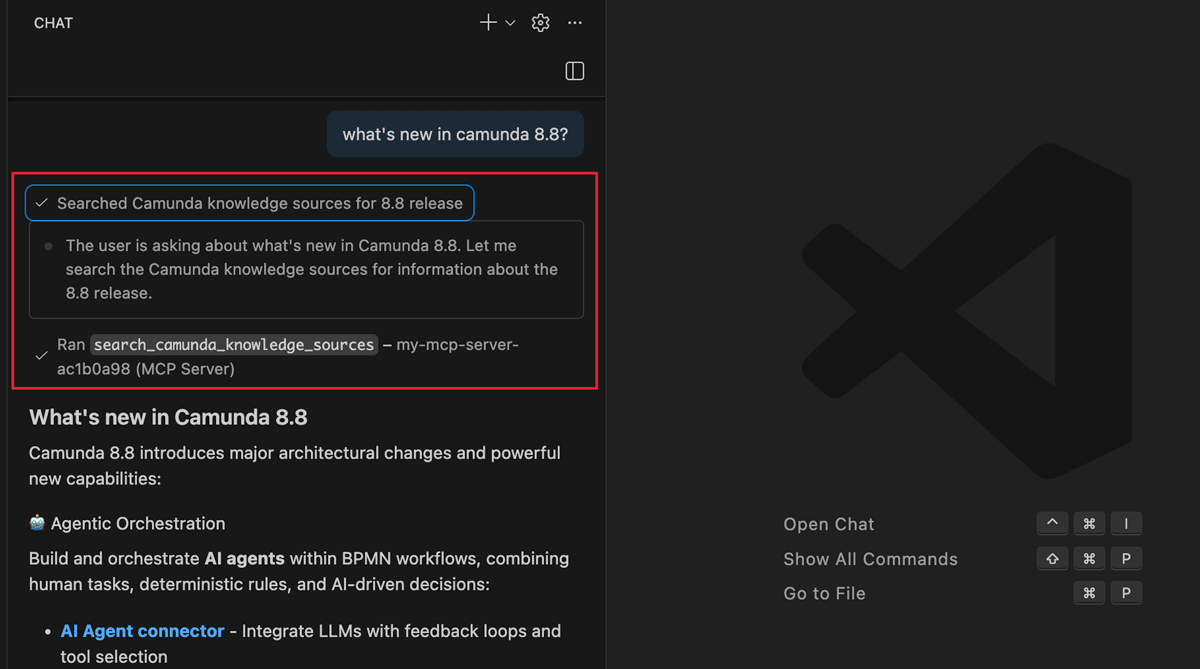
The MCP server is available at the following URL:
https://camunda-docs.mcp.kapa.ai
Install
One-click install
You can perform a one-click installation or copy the MCP server URL via the Use MCP dropdown.
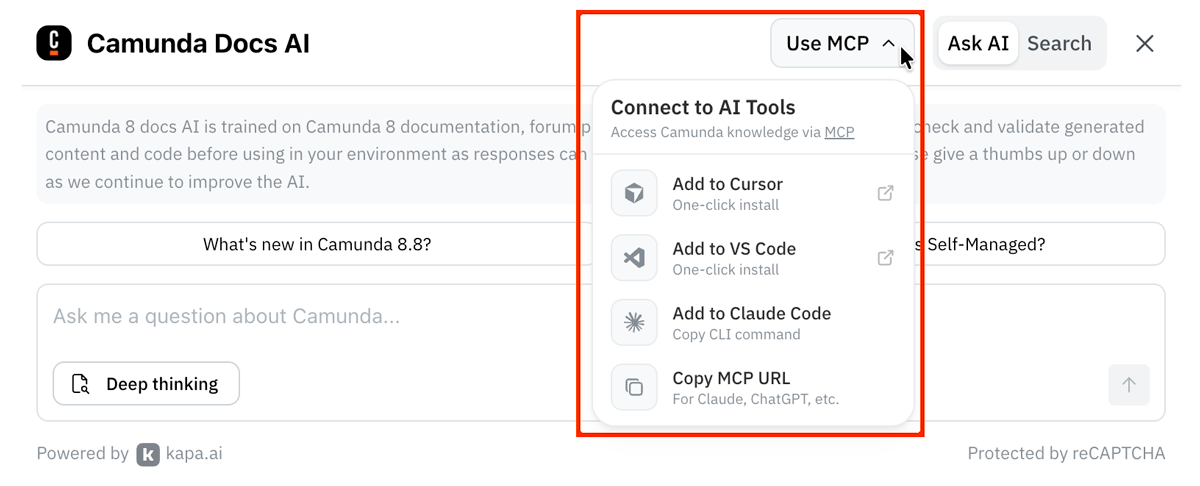
Manual install
The steps required to manually install the MCP server varies depending on your IDE/AI tool. For example:
- VS Code Copilot
- Cursor
- ChatGPT Desktop
- Other MCP clients
Prerequisites: VS Code 1.102+ with GitHub Copilot enabled.
Create an mcp.json file in your workspace .vscode folder:
{
  "servers": {
    "camunda docs": {
      "type": "http",
      "url": "https://camunda-docs.mcp.kapa.ai"
    }
  }
}
For more information, refer to the MCP servers in VS Code documentation.
Add the following to your .cursor/mcp.json file:
{
  "mcpServers": {
    "camunda docs": {
      "type": "http",
      "url": "https://camunda-docs.mcp.kapa.ai"
    }
  }
}
For more information, refer to the Cursor MCP documentation.
ChatGPT Desktop supports MCP servers in developer mode:
- Open ChatGPT Desktop.
- Navigate to Settings > Features.
- Enable Developer mode.
- Navigate to Settings > MCP Servers.
- Click Add Server and enter:
- Name:
camunda docs - URL:
https://camunda-docs.mcp.kapa.ai
- Name:
For more information, refer to the ChatGPT Desktop MCP documentation.
Use the server URL https://camunda-docs.mcp.kapa.ai and refer to your client's documentation for installation instructions.
Most clients accept the standard MCP protocol JSON configuration format:
{
  "mcpServers": {
    "camunda docs": {
      "url": "https://camunda-docs.mcp.kapa.ai"
    }
  }
}
Usage and limits
The Camunda Docs MCP server is not designed for use in production environments, high-volume automation, or as part of a CI/CD pipeline. It is provided to help support Camunda developer IDE queries and for coding assistance, evaluation, and testing. You must always check and validate AI generated content and code as responses can be inaccurate.
Once connected to the MCP server within your editor, you can ask context-aware questions about Camunda. For example:
- "What is BPMN?"
- "How do I build an AI agent?"
- "What properties are changed for Camunda 8.8?"
Authentication
When connecting to the MCP server for the first time, you must authenticate via Google sign-in.
This anonymous Google ID is only used to enforce per-user rate limits and prevent abuse of the Camunda Docs MCP server:
- 40 requests per user per hour.
- 200 requests per user per day.
The MCP server is powered by the Kapa.ai AI assistant. Refer to the Kapa documentation to learn more about authentication.
Tools
The MCP server exposes a single semantic search tool:
search_camunda_knowledge_sources
This tool allows AI tools/agents to perform semantic retrieval over the Camunda 8 documentation and other public knowledge sources, such as forum posts, repos, podcasts, and product blogs.
Example VS Code Copilot integration
- Install the Camunda Docs MCP server.
- In VS Code, open Copilot Chat.
- Select Agent mode from the Set Agent drop-down menu.
- Click Configure Tools to check the
search_camunda_knowledge_sourcestool is available and selected. - Ask context-aware questions about Camunda.